
Plugnition Order Note Templates for WooCommerce
Plugnition Order Note Templates for WooCommerce helps you save time by turning repeated order messages into reusable templates. Instead of typing the same notes over and over again, you can create ready-made order note templates and insert them into WooCommerce orders with just a few clicks.
Whether you regularly send payment reminders, shipping confirmations, address check requests, or internal staff notes, this plugin makes your order management workflow faster, cleaner, and more consistent.
Why use this plugin?
Many WooCommerce stores send the same types of order notes every day. Writing them manually takes time, creates inconsistencies, and increases the chance of mistakes. This plugin solves that by giving you a simple system for storing reusable note templates and applying them directly from the order screen.
It is lightweight, focused, and designed to fit naturally into the WooCommerce admin without adding unnecessary complexity.
Main features
- Create and manage reusable order note templates
- Insert templates directly from the WooCommerce order edit screen
- Choose whether a template should be used as a private note or a customer note
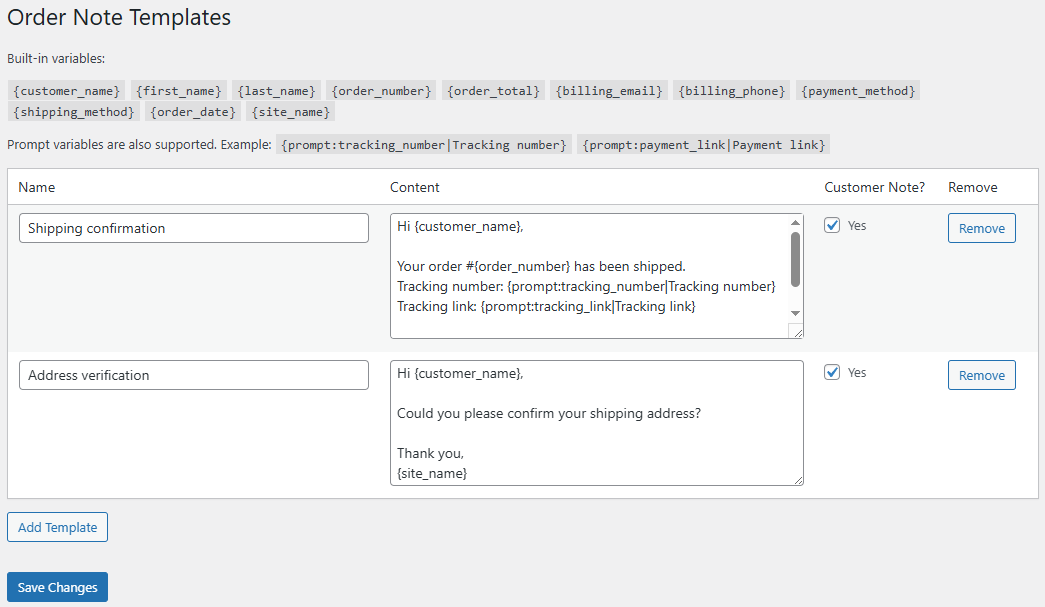
- Use built-in dynamic variables such as customer name, order number, order total, payment method, shipping method, and more
- Use prompt-based variables that ask for custom values before inserting the note
- Keep order communication consistent across your team
- Reduce repetitive admin work and speed up daily order handling
Built-in dynamic variables
The plugin supports useful WooCommerce order variables that are automatically replaced when the note is inserted.
{customer_name}{first_name}{last_name}{order_number}{order_total}{billing_email}{billing_phone}{payment_method}{shipping_method}{order_date}{site_name}
Prompt-based variables
The plugin supports prompt-based placeholders. These let you insert custom values when needed, without having to edit the template manually each time.
For example, you can create templates containing placeholders like:
{prompt:tracking_number|Tracking number}
{prompt:tracking_link|Tracking link}
{prompt:payment_link|Payment link}
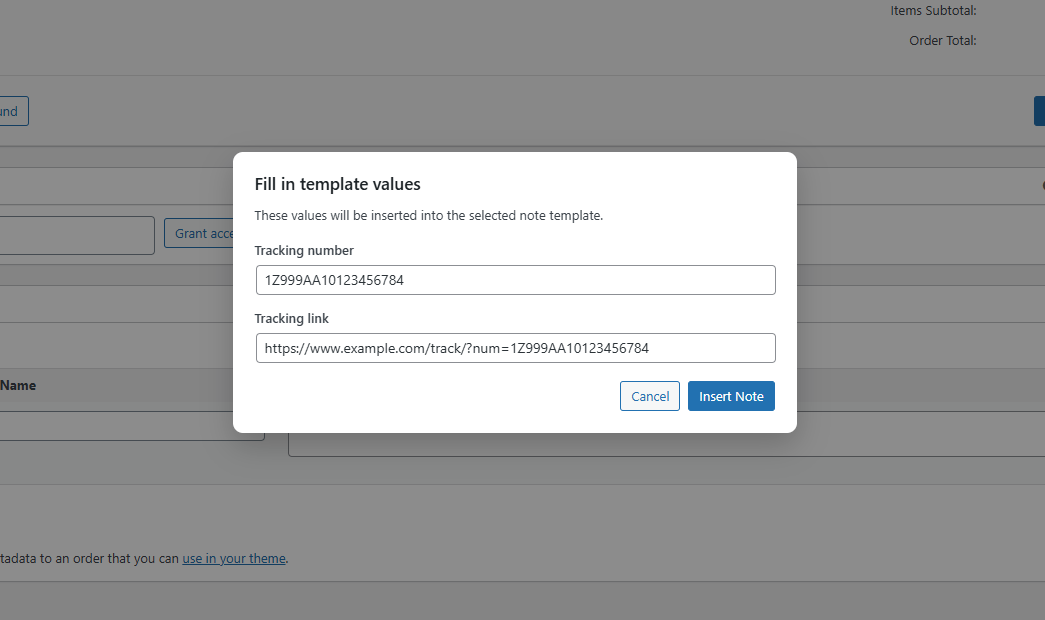
When you insert the template, the plugin will ask you to enter those values and then automatically place them into the note.
Example use cases
- Shipping confirmation notes with tracking details
- Payment reminder notes with payment instructions or links
- Address verification requests
- Internal warehouse or fulfillment notes
- Reusable support replies for common order situations
Example template
Hi {customer_name},

Your order #{order_number} has been shipped.
Tracking number: {prompt:tracking_number|Tracking number}
Tracking link: {prompt:tracking_link|Tracking link}

Thank you,
{site_name}
Simple, practical, and lightweight
Plugnition Order Note Templates for WooCommerce is built for stores that want a faster and more organized admin workflow without installing a bloated automation system. It focuses on one job and does it well: helping you reuse order notes efficiently.
If your team regularly sends the same messages to customers or leaves the same internal notes on orders, this plugin can quickly become a daily productivity tool.
Who is it for?
- WooCommerce stores processing orders manually
- Stores that frequently send customer order updates
- Shop managers who want more consistency in order communication
- Teams looking to save time in the WooCommerce admin
Conclusion
Plugnition Order Note Templates for WooCommerce makes order communication faster, more consistent, and easier to manage. Create reusable notes, insert them in seconds, and use dynamic placeholders to personalize messages without repetitive typing.
Frequently Asked Questions
What are WooCommerce order note templates?
Order note templates are reusable messages that you can quickly insert into WooCommerce orders. They are useful for payment reminders, shipping updates, address verification requests, internal instructions, and other frequently repeated notes.
Can I create my own order note templates?
Yes. You can create and manage custom templates for any messages your store regularly adds to WooCommerce orders.
Can templates be used for both customer and private notes?
Yes. Each template can be configured for use as either a customer note or a private order note.
Can order details be inserted automatically?
Yes. The plugin supports dynamic variables for information such as the customer name, order number, order total, billing email, billing phone, payment method, shipping method, order date, etc.
What are prompt-based variables?
Prompt-based variables ask you to enter a value when inserting a template. They are useful for details that differ with each order, such as a tracking number, tracking link, payment link, or other custom information.
Where can I insert an order note template?
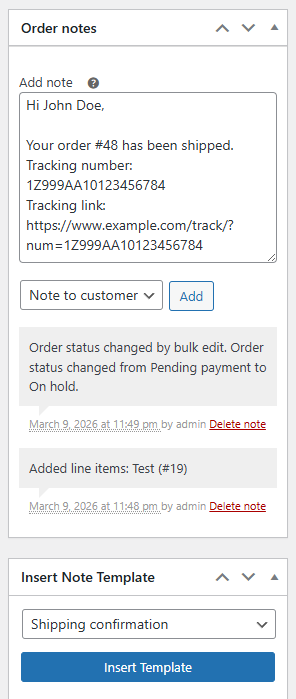
Templates can be selected and inserted directly from the WooCommerce order edit screen, so you do not need to leave the order or copy messages from another location.
Can multiple staff members use the same templates?
Yes. Store administrators and shop managers can use the same predefined templates, helping your team communicate more consistently and avoid typing mistakes.
Does the plugin work with HPOS?
Yes. The plugin is compatible with WooCommerce High-Performance Order Storage (HPOS).
Will using a template add the note immediately?
The template prepares the note and replaces its variables with the relevant values. You can review the completed message before adding it to the order.
Reviews
There are no reviews yet.