
Plugnition Order Merge for WooCommerce
Plugnition Order Merge for WooCommerce helps store admins combine two WooCommerce orders into one clean, updated order without manually recreating line items.
Whether a customer placed multiple orders by mistake, needs items consolidated into one shipment, or requires a cleaner order history, this plugin gives you a simple admin tool to merge order contents while keeping the original source order safely preserved.
Key Features
- Merge one order into another directly from the WooCommerce admin area.
- Copy products, fees, shipping lines, coupons, and item meta from the source order to the target order.
- Automatically recalculate order totals after the merge.
- Preserve the original source order instead of deleting it.
- Add admin order notes so merged orders remain easy to track.
- HPOS-compatible for modern WooCommerce stores.
- Secure admin-only workflow with nonce and capability checks.
- Lightweight and focused with no unnecessary bloat.
Why Use Order Merge?
Managing customer orders can get messy when a buyer places duplicate or separate orders that should really be handled together. Instead of manually copying products, fees, shipping, and order details, Plugnition Order Merge for WooCommerce lets you consolidate order contents faster and with fewer mistakes.
Common Use Cases
- Combine multiple orders from the same customer.
- Merge duplicate orders created by mistake.
- Prepare one consolidated order for shipping.
- Move products from one order into another for cleaner admin management.
- Keep source orders available for reference and audit history.
Built for Safe Admin Workflows
The plugin does not silently delete or overwrite the source order. Instead, it copies the selected order contents into the target order, recalculates totals, and adds helpful order notes so your team can see what was merged and when.
Simple WooCommerce Admin Tool
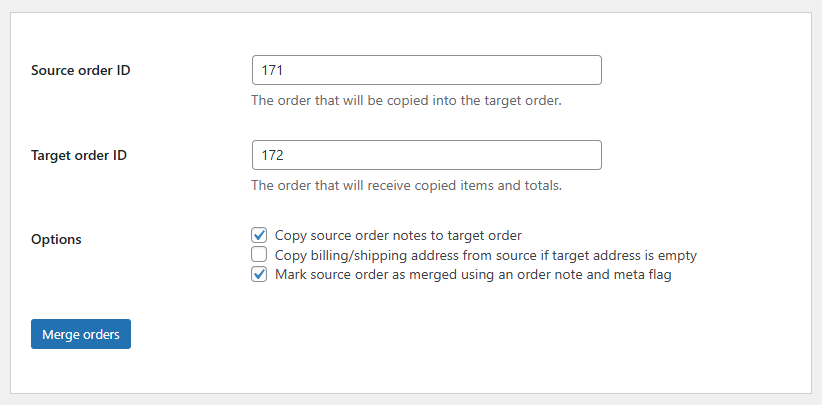
After activation, store admins can access the merge screen from the WooCommerce admin menu. Enter the source order ID, choose the target order ID, select merge options, and process the merge in just a few clicks.
Perfect For
- WooCommerce store owners
- Shop managers
- Customer support teams
- Fulfillment teams
- Agencies managing WooCommerce stores
Lightweight, Practical, and WooCommerce-Friendly
Plugnition Order Merge for WooCommerce is designed to solve one specific admin problem clearly and efficiently. It follows WooCommerce order-handling standards, supports HPOS, and keeps the merge process transparent with order notes and preserved source orders.
Frequently Asked Questions
What does the WooCommerce Order Merge plugin do?
The plugin lets store administrators merge the contents of one WooCommerce order into another. It provides a quick way to consolidate separate or duplicate orders without manually recreating their items.
What information can be merged between orders?
The plugin can copy products, item metadata, fees, shipping lines, coupons, notes, and customer details from the source order to the target order.
Are order totals recalculated after a merge?
Yes. The target order’s totals are automatically recalculated after the selected order contents have been merged.
What happens to the source order?
The source order is preserved and is not automatically deleted or overwritten. This keeps the original order available for reference and audit purposes.
Can I merge multiple orders from the same customer?
Yes. You can merge each source order into the chosen target order, making it easier to consolidate multiple purchases into one order for administration or fulfillment.
Does the plugin record that an order was merged?
Yes. The plugin adds admin order notes to help your team identify which orders were merged and maintain a transparent order history.
Where can I merge WooCommerce orders?
After activating the plugin, open its merge screen from the WooCommerce admin area. Enter the source and target order IDs, select the required merge options, and process the merge.
Does the plugin support WooCommerce HPOS?
Yes. WooCommerce Order Merge is compatible with High-Performance Order Storage (HPOS).
Reviews
There are no reviews yet.