
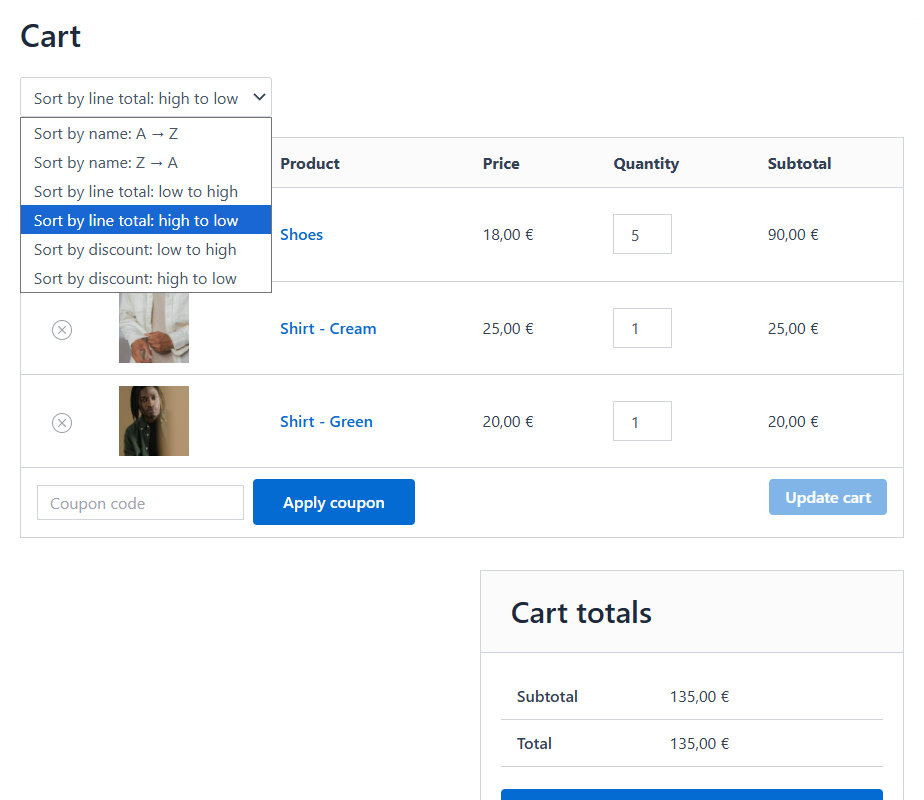
🚀 WooCommerce Cart Item Sorting – Give your customers a cleaner, smarter, and more organized cart experience
Large or complex carts can quickly become messy — especially when customers buy multiple variations, bulk quantities, or products from different categories. The WooCommerce Cart Item Sorting plugin brings order to the chaos by automatically arranging cart items based on the sorting rule you choose.
Whether you want to sort items alphabetically, group products by category, highlight best deals, or show the most expensive items first, this plugin gives you full control with just a few clicks.
🔄 Sort Cart Items by What Matters Most
Choose from a wide range of sorting options to perfectly match your store’s needs:
- Product Name – Alphabetical A→Z or Z→A
- Price – Sort by unit price
- Quantity – Useful for bulk orders
- Line Total – Price × quantity
- Discount Amount
- Discount Percentage – Make the biggest savings stand out
- Category – Group similar products
- Tag – Useful for stores using tags as filters
- Brand – Ideal for multi-brand shops
Your selected sorting method automatically updates the cart anytime quantities change, or items are added or removed.
🎯 Why Improve Cart Sorting?
A clean, well-organized cart makes a big difference in customer experience and conversions:
✔ Faster review of cart contents
Customers can quickly locate items, compare prices, and confirm order details.
✔ Highlights savings and promotions
Sorting by discount or price draws attention to deals and encourages larger purchases.
✔ Reduces cart confusion
Perfect for stores with configurable products, wholesale orders, or large carts.
✔ Enhances checkout flow
A tidy cart results in a smoother, more confident checkout process.
⚙️ Simple Setup — No Coding Required
- Activate the plugin
- Choose your desired sorting rule
- The cart automatically reorganizes items based on your selection
- Optionally, add a sorting dropdown to the cart page on the frontend for your customers
It uses clean, lightweight code designed to work with any WooCommerce-compatible theme.
🌟 Perfect For
- Retail stores with many product variations
- Wholesale or B2B shops
- Digital product stores
- Multi-brand retailers
- Any WooCommerce site wanting a more polished cart experience
🎁 Included With Your Purchase
- Lifetime updates
- Lifetime support
- Use on unlimited websites
- Fast, lightweight, and reliable code
Settings
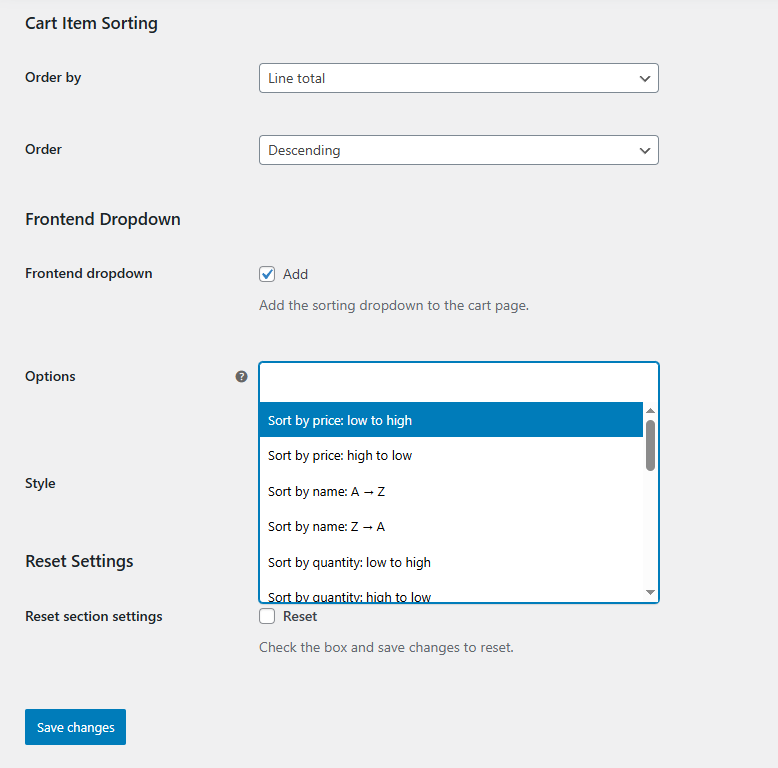
WooCommerce Cart Item Sorting plugin settings allow you to choose a default cart item sort order and front-end dropdown options:
Frequently Asked Questions
What does the WooCommerce Cart Item Sorting plugin do?
The plugin lets you automatically or manually reorder products in the WooCommerce cart, making it easier for customers to review and organize their items.
Which sorting options are available?
Cart items can be sorted by line total, quantity, product name, category, tag, brand, price, discount amount, or discount percentage.
Can customers choose how to sort their cart items?
Yes. The plugin can give customers control over how products are arranged in their cart, helping them navigate carts containing many items.
Can cart items be sorted automatically?
Yes. Store owners can configure automatic sorting so cart items are displayed in a consistent and useful order without requiring customer input.
Does the plugin change the order of products in the shop or catalog?
No. The plugin sorts products inside the WooCommerce cart and does not change their order on shop, category, or other product archive pages.
Can the plugin help customers find discounted products in their cart?
Yes. Items can be sorted by discount amount or discount percentage, making the products with the largest savings easier to identify.
Is the plugin useful for carts with many products?
Yes. Organizing items by name, category, price, quantity, or another relevant value can make large carts clearer and easier to review before checkout.
Will it work with my WooCommerce theme?
The plugin is designed to work with WooCommerce-compatible themes. Its lightweight implementation integrates with the standard WooCommerce cart experience.
Does the plugin modify product or order data?
No. Sorting changes the order in which cart items are displayed; it does not modify product details, prices, quantities, or other order data.
Reviews
There are no reviews yet.