Displaying a price per unit in WooCommerce helps customers understand exactly how much they are paying for each item, kilogram, liter, meter, or other unit of measurement.
Instead of showing only a product price such as $24.00, you can display additional information such as $2.40 per 100 g, $8.00/kg, or $3.00 per item.
This is especially useful for stores selling food, beverages, construction materials, cosmetics, wholesale products, and products sold in packs.
In this guide, we’ll explain what price per unit means, how it can be calculated, and how to add price-per-unit information to WooCommerce products.
- What Is Price Per Unit?
- Why Display Price Per Unit in WooCommerce?
- How to Calculate Price Per Unit
- How to Add Price Per Unit in WooCommerce
- Price Per Unit Examples
- Where Should Price Per Unit Be Displayed?
- Price Per Unit for Variable Products
- Automating Price Per Unit Calculations
- Price Per Unit vs. Product Price
- Is Price Per Unit Useful for Every WooCommerce Store?
- Conclusion
What Is Price Per Unit?
Price per unit shows the cost of a product relative to a specific quantity or measurement.
For example, imagine a WooCommerce product contains 500 grams and costs $10.00. Its price per kilogram is:
$10.00 ÷ 0.5 kg = $20.00/kg
You could therefore display the product price like this:
$10.00 ($20.00/kg)
The same concept can be used with many different units, including:
- kg
- g
- liter
- ml
- meter
- cm
- m²
- item
- piece
- pack
The appropriate unit depends on what your WooCommerce store sells.
Why Display Price Per Unit in WooCommerce?
WooCommerce normally displays the total product price. While this is sufficient for many products, it can make comparisons difficult when products contain different quantities.
For example, consider two bags of coffee:
- 500 g for $12.00
- 750 g for $16.50
Looking only at the total price, the first product appears cheaper. Calculating the price per kilogram makes the comparison much clearer:
- 500 g for $12.00 = $24.00/kg
- 750 g for $16.50 = $22.00/kg
The larger package actually offers the lower unit price.
Displaying this information directly on the product page can improve price transparency and make it easier for customers to compare products without doing calculations themselves.
How to Calculate Price Per Unit
The basic formula is:
Price per unit = Product price ÷ Quantity
For example, if a pack contains 12 bottles and costs $30:
$30 ÷ 12 = $2.50 per bottle
If a 2 kg product costs $18:
$18 ÷ 2 = $9.00/kg
Sometimes you may want to normalize the price to a different measurement. For example, a 250 g product costing $4.50 can be converted to price per kilogram:
$4.50 ÷ 250 × 1000 = $18.00/kg
This normalized value makes products with different package sizes much easier to compare.
How to Add Price Per Unit in WooCommerce
WooCommerce does not provide a general-purpose price-per-unit display for every type of product by default.
You could add the functionality with custom PHP code, but this becomes more complicated when you need to account for different products, quantities, measurement units, sale prices, and variations.
A simpler solution is to use a dedicated plugin.
The WooCommerce Price per Unit Display plugin allows you to add price-per-unit information directly to your WooCommerce store.
This lets customers see both the normal WooCommerce product price and the corresponding unit price without manually calculating it themselves.
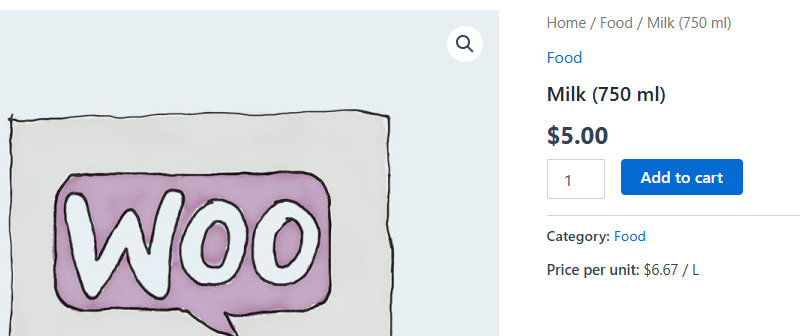
Price Per Unit Examples
Price-per-unit information can be useful across many types of WooCommerce stores.
Food Products
A 500 g package costs $7.50:
$7.50 ($15.00/kg)
Beverages
A 750 ml bottle costs $12.00:
$12.00 ($16.00/liter)
Products Sold in Packs
A package containing 24 units costs $48.00:
$48.00 ($2.00/item)
Building Materials
A 5-meter product costs $35.00:
$35.00 ($7.00/m)
Cosmetics
A 200 ml product costs $14.00:
$14.00 ($7.00/100 ml)
The format you choose should match the type of product and the measurement customers commonly use when comparing prices.
Where Should Price Per Unit Be Displayed?
The most important location is usually the WooCommerce single-product page, where customers make their purchasing decision.
A typical price display might look like this:
$19.99
$3.33 per 100 g
Depending on your store, unit pricing can also be useful on:
- Shop pages
- Product category pages
- Product search results
- Related product sections
- Upsell and cross-sell product listings
Showing the unit price on product listings can be particularly useful because customers can compare products before opening each individual product page.
Price Per Unit for Variable Products
Variable products require additional consideration because different variations may have different prices, quantities, or sizes.
For example, a coffee product could have these variations:
- 250 g – $6.00
- 500 g – $10.00
- 1 kg – $18.00
The corresponding unit prices would be:
- 250 g – $24.00/kg
- 500 g – $20.00/kg
- 1 kg – $18.00/kg
This demonstrates another benefit of unit pricing: customers can immediately see that the largest variation offers the lowest price per kilogram.
When implementing unit pricing for variable products, the displayed value should ideally correspond to the currently selected variation rather than showing one static value for the entire product.
Automating Price Per Unit Calculations
For a store with only a few products, calculating unit prices manually may be manageable. However, it quickly becomes inconvenient when you have dozens or hundreds of products.
Manual calculations can also become outdated whenever you change a product price.
Automating the calculation means the displayed unit price can be generated from the product’s current price and configured quantity. This reduces maintenance and helps keep the values consistent with your WooCommerce pricing.
For example, if a product changes from $20 to $24 and contains 4 units, an automatically calculated price can change from:
$5.00/item
to:
$6.00/item
without requiring you to manually edit the unit-price text.
Price Per Unit vs. Product Price
Price per unit should generally supplement your normal WooCommerce product price rather than replace it.
The customer still needs to know the actual amount that will be added to the cart.
For example:
$29.99 ($5.00/kg)
Here, $29.99 is the amount the customer pays for the product, while $5.00/kg provides additional information that makes comparison easier.
Is Price Per Unit Useful for Every WooCommerce Store?
Not necessarily. Unit pricing provides the most value when customers compare products based on quantity, weight, volume, length, area, or the number of items included.
It is especially useful for stores selling:
- Groceries and food
- Beverages
- Supplements
- Cosmetics
- Cleaning products
- Wholesale goods
- Construction materials
- Fabric and flooring
- Products sold in multipacks
For products where quantity is not an important purchasing factor, displaying a unit price may not provide much additional value.
Conclusion
Adding price per unit to WooCommerce gives customers more useful pricing information and makes products with different quantities easier to compare.
The calculation itself is straightforward:
Product price ÷ product quantity = price per unit
However, manually calculating and maintaining unit prices can become difficult as your catalog grows or product prices change.
Using the WooCommerce Price per Unit Display plugin can automate the process and display unit pricing directly alongside your normal WooCommerce prices.
This gives customers clearer pricing information while allowing you to manage unit prices directly within your WooCommerce store.
Recommended Plugins
-
WooCommerce Download Button
Make free WooCommerce downloads truly instant with a one-click Download button. No cart, no checkout — just download.
-
WooCommerce Easy Product Editor
Quickly create and update WooCommerce products with a simple, user-friendly editor.
-
WooCommerce MPN
Add Manufacturer Part Numbers (MPNs) to your WooCommerce products to improve product identification, catalog accuracy, and marketplace compatibility.
-
WooCommerce Price per Unit Display
Display price per unit in WooCommerce products, including shop and product pages, with smart defaults and variation support.
-
WooCommerce Product Expiration Dates
Set expiration dates for WooCommerce products and automatically expire them by date.