
MPN for WooCommerce makes it easy to add, manage, and display Manufacturer Part Numbers (MPNs) across your WooCommerce store. Whether you sell electronics, automotive parts, tools, or any product that relies on precise identification, this plugin helps you maintain accurate product data and improve customer confidence.
WooCommerce MPN – Add Manufacturer Part Numbers to Your Store
The WooCommerce MPN plugin lets you add, manage, and optionally display Manufacturer Part Numbers (MPNs) for your products — including variations — directly in WooCommerce. It helps you maintain clean product data, improve identification, and support integrations with marketplaces and product feeds.
Why MPN Matters
Many marketplaces and comparison engines require unique product identifiers, such as MPN or GTIN, to properly list and match products. Without them, your items may be misidentified or even rejected.
By storing accurate MPNs, you:
- Improve catalog accuracy and reduce product mix-ups
- Make it easier for customers to verify they’re buying the correct item
- Provide better data for feeds, search engines, and third-party integrations
Key Features
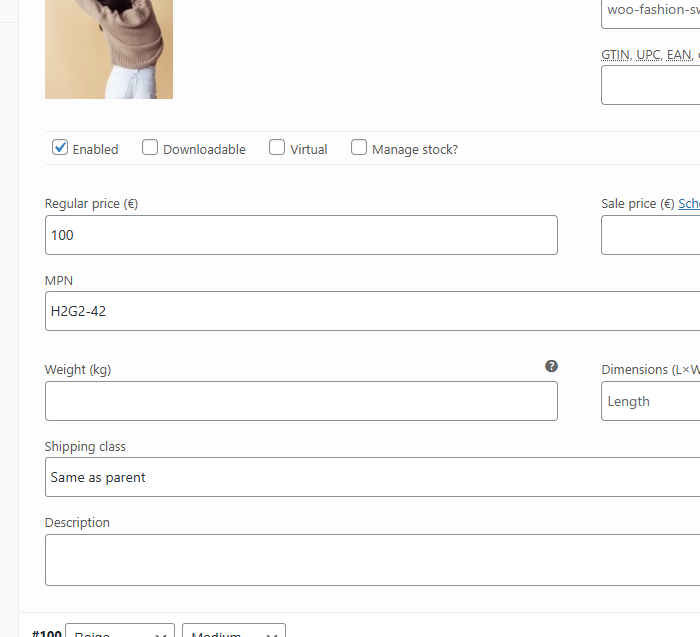
- MPN Field for Products: Add MPN values to simple and variable products from the WooCommerce product edit screen.
- Variation Support: Store a different MPN for each variation where needed (sizes, colors, models, etc.).
- Optional Frontend Display: Show MPN on product pages to help customers confirm they’re purchasing the correct part or model.
- Structured Data Friendly: Use MPNs as part of your product schema for richer, more complete product data.
- Lightweight & Native: Integrates cleanly with WooCommerce and follows familiar UI patterns in the product editor.
Perfect For
- Stores selling electronics, auto parts, tools, or industrial components.
- Merchants who need precise product identification for customer support and returns.
- Shop owners preparing their catalogs for marketplaces, feeds, or comparison engines.
Frequently Asked Questions
What is an MPN in WooCommerce?
MPN stands for Manufacturer Part Number. It is a manufacturer-assigned identifier used to uniquely identify a specific product or model. Adding MPNs to WooCommerce products helps improve product identification, catalog accuracy, and compatibility with product feeds and marketplaces.
Why should I add MPNs to my WooCommerce products?
MPNs help customers identify the exact product they are purchasing and provide more complete product information for search engines, marketplaces, comparison sites, and third-party product feeds.
Does WooCommerce MPN support variable products?
Yes. The plugin supports variable products and allows you to assign a different MPN to individual variations when each variation has its own manufacturer part number.
Can each product variation have a different MPN?
Yes. You can assign a unique MPN to each product variation, which is useful when different sizes, colors, models, or configurations have different manufacturer part numbers.
Can I display the MPN on the product page?
Yes. WooCommerce MPN includes an optional frontend display feature that lets you show the MPN on your product pages, making it easy for customers to verify the product or part number.
Does WooCommerce MPN add MPN information to product structured data?
Yes. The plugin is designed to add MPN information to your product structured data, helping search engines better understand and identify your products.
Can MPNs help with Google Shopping or product feeds?
Yes. MPNs are commonly used as product identifiers in Google Shopping, product feeds, marketplaces, and other integrations. Adding accurate MPN data can make your product information more complete and easier for compatible services to process.
Is MPN the same as SKU or GTIN?
No. An SKU is a store-specific identifier, while an MPN is assigned by the manufacturer. A GTIN is a standardized global product identifier such as a UPC or EAN. Depending on your products and sales channels, you may need one or more of these identifiers.
Reviews
There are no reviews yet.