MPN vs SKU vs GTIN in WooCommerce: What’s the Difference?
When managing products in WooCommerce, you may come across several different product identifiers: SKU, MPN, and GTIN.
Although they can look similar, they serve different purposes. An SKU is normally created by the store owner for internal inventory management, an MPN is assigned by the manufacturer, and a GTIN is a standardized global identifier commonly represented by a barcode.
Understanding the difference is especially important if you sell branded products, replacement parts, electronics, or products through external channels such as Google Shopping.
In this guide, we’ll explain what SKU, MPN, and GTIN mean, how they differ, and when you should use each one in WooCommerce.
- What Is an SKU?
- What Is an MPN?
- What Is a GTIN?
- MPN vs SKU vs GTIN: Quick Comparison
- Can a Product Have an SKU, MPN, and GTIN?
- Which Product Identifiers Should You Use in WooCommerce?
- What About Product Variations?
- Why Product Identifiers Matter for Google Shopping
- How to Add MPN to WooCommerce
- Common Product Identifier Mistakes
- Frequently Asked Questions
What Is an SKU?
SKU stands for Stock Keeping Unit.
An SKU is an internal identifier that a store uses to identify and manage products. You normally create the SKU yourself, which means there is no universal SKU for a particular product.
For example, your store might use:
TSHIRT-BLK-M
for a medium black T-shirt.
Another retailer selling exactly the same T-shirt might use a completely different SKU such as:
APP-1048-M-BK
Both values are valid because SKUs only need to make sense within each retailer’s inventory system.
What Are SKUs Used For?
SKUs are primarily useful for internal store operations, including:
- Inventory management
- Finding products quickly in the WooCommerce admin
- Processing and fulfilling orders
- Connecting WooCommerce to warehouse or ERP systems
- Importing and exporting product data
- Distinguishing between product variations
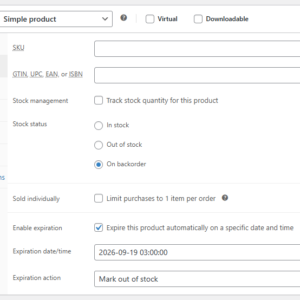
WooCommerce includes native support for SKUs. You can enter an SKU when editing a product under the product’s inventory settings.
Each SKU should be unique within your WooCommerce store.
What Is an MPN?
MPN stands for Manufacturer Part Number.
Unlike an SKU, an MPN is normally assigned by the manufacturer rather than by the retailer.
For example, imagine several online stores sell the same replacement part manufactured by Company ABC. The manufacturer might assign the part this MPN:
ABC-XR450-B
Every retailer selling that exact manufacturer part should generally use the same MPN.
This makes MPNs useful for identifying and comparing the same product across different stores, catalogs, distributors, and marketplaces.
Where Are MPNs Commonly Used?
MPNs are particularly common for products such as:
- Electronics
- Computer components
- Automotive parts
- Machine and industrial components
- Appliances
- Replacement parts
- Tools and equipment
For these types of products, customers may even search directly for the MPN when they already know the exact part they need.
For example, instead of searching for:
replacement water pump
a customer might search for:
ABC-XR450-B
Providing the correct MPN can therefore make it easier to match your WooCommerce product with the exact product a customer is looking for.
What Is a GTIN?
GTIN stands for Global Trade Item Number.
A GTIN is a globally standardized product identifier. It is commonly encoded in the barcode printed on a product or its packaging.
GTIN is actually an umbrella term covering several identifier formats you may already recognize, including:
- UPC – commonly used in North America
- EAN – widely used internationally
- ISBN – used for books
- ITF-14 – often used for cases or grouped trade items
Unlike an SKU, a GTIN is not something a retailer should simply invent for an existing commercial product. It identifies a particular trade item across businesses and markets.
GTIN Support in WooCommerce
Modern versions of WooCommerce include a built-in field for a product’s global unique identifier, which can be used for identifiers such as GTIN, UPC, EAN, or ISBN.
This is separate from the WooCommerce SKU field because the two identifiers serve different purposes.
MPN vs SKU vs GTIN: Quick Comparison
| Identifier | Meaning | Usually Assigned By | Unique Where? | Main Purpose |
|---|---|---|---|---|
| SKU | Stock Keeping Unit | Retailer / store owner | Your store | Internal inventory management |
| MPN | Manufacturer Part Number | Manufacturer | Manufacturer’s catalog | Identify a specific manufacturer’s product or part |
| GTIN | Global Trade Item Number | Brand owner / manufacturer through the applicable standards system | Globally | Standardized product identification |
The simplest way to remember the difference is:
- SKU: your identifier.
- MPN: the manufacturer’s identifier.
- GTIN: the standardized global identifier.
Can a Product Have an SKU, MPN, and GTIN?
Yes. In many WooCommerce stores, a single product should have all three.
For example, suppose you sell a Bosch replacement component. Its identifiers might look like this:
| SKU | PART-00841 |
|---|---|
| MPN | BOSCH-123456 |
| GTIN | 4000001234567 |
The SKU helps your business manage the item.
The MPN identifies the product within the manufacturer’s product catalog.
The GTIN provides a standardized global identifier for the trade item.
There is therefore no need to choose between them when all three identifiers are available. They complement one another rather than replace one another.
Which Product Identifiers Should You Use in WooCommerce?
The identifiers you need depend largely on the products you sell.
Use an SKU for Internal Product Management
For most WooCommerce stores, assigning an SKU to each product or variation is useful even when the product already has an MPN or GTIN.
Your SKU can follow whatever structure works best for your inventory and fulfillment processes.
Use an MPN When the Manufacturer Provides One
If you sell branded products or manufacturer-supplied parts, store the actual manufacturer part number whenever it is available.
Don’t automatically copy your WooCommerce SKU into the MPN field. They represent different things unless you are the manufacturer and have intentionally designed them to be the same identifier.
Use a GTIN When the Product Has One
If a commercially manufactured product has a UPC, EAN, ISBN, or another GTIN, store the actual identifier assigned to that product.
A GTIN should not be invented simply because a product doesn’t have one.
What About Product Variations?
Product identifiers become particularly important when you sell variable products.
Different variations can represent distinct trade items and may therefore have their own identifiers.
For example, consider a T-shirt available in two colors:
| Variation | SKU | MPN | GTIN |
|---|---|---|---|
| Black / Medium | TS-BLK-M | TS100-BLK-M | 1234567890001 |
| Blue / Medium | TS-BLU-M | TS100-BLU-M | 1234567890002 |
The two products may look almost identical, but different variations can have different SKUs, manufacturer part numbers, and GTINs.
When the manufacturer provides variation-specific identifiers, store those identifiers at the variation level rather than assigning one identifier to every variation.
Why Product Identifiers Matter for Google Shopping
Product identifiers aren’t only useful for inventory management. They can also be important when sending WooCommerce products to Google Merchant Center and other shopping platforms.
Identifiers help shopping platforms understand exactly which real-world product your listing represents and match it with product information from other sources.
Google commonly uses identifiers such as:
- GTIN
- MPN
- Brand
If a product has manufacturer-assigned identifiers, you should provide the correct values whenever possible.
For example, you should not use your internal WooCommerce SKU as the GTIN simply because both fields contain product codes. Similarly, you should not invent an MPN for an existing branded product that already has a manufacturer-assigned part number.
Accurate identifiers make it easier for external platforms to understand and match your products correctly.
How to Add MPN to WooCommerce
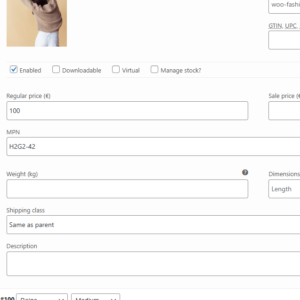
WooCommerce provides built-in fields for SKUs and global identifiers such as GTIN, but stores that need dedicated Manufacturer Part Number management may also want a separate MPN field.
MPN for WooCommerce adds dedicated MPN functionality to WooCommerce so you can store manufacturer part numbers separately from your internal SKUs and other product identifiers.
This is especially useful when your catalog contains products where the manufacturer part number is an important piece of product information, such as automotive parts, electronics, equipment, or replacement components.
Keeping MPN and SKU in separate fields also avoids one of the most common product-data mistakes: treating an internal inventory identifier as though it were the manufacturer’s identifier.
Common Product Identifier Mistakes
1. Using the SKU as the MPN for Every Product
Your SKU is normally an internal identifier, while the MPN comes from the manufacturer. They should only be identical when there is a legitimate reason for them to be.
2. Putting an MPN in the GTIN Field
An MPN such as XR-500-BLK is not automatically a GTIN. GTINs follow standardized formats such as UPC and EAN.
3. Inventing a GTIN
If a product does not have an assigned GTIN, don’t create a random number just to populate the field.
4. Using One Identifier for Every Variation
Colors, sizes, capacities, and other variations can have their own manufacturer identifiers. Whenever variation-specific identifiers are supplied, store them on the corresponding variation.
5. Assuming Every Product Has Every Identifier
Not every product has an MPN or GTIN. Handmade, custom, vintage, and certain private-label products may not have the same identifiers as mass-manufactured branded products.
Use the identifiers that genuinely apply to the product instead of creating placeholder values simply to fill every field.
Frequently Asked Questions
Is an MPN the same as an SKU?
No. An SKU is generally assigned by the retailer for internal inventory management, while an MPN is assigned by the manufacturer to identify a particular product or part.
Is an MPN the same as a GTIN?
No. An MPN is a manufacturer’s own part number. A GTIN is a standardized global trade identifier and includes formats such as UPC, EAN, and ISBN.
Can an SKU and MPN have the same value?
They can, but that does not make them the same type of identifier. A store could deliberately use a manufacturer’s MPN as its internal SKU, but the SKU and MPN still serve different purposes.
Does WooCommerce support SKUs?
Yes. WooCommerce includes built-in SKU support for products and variations. SKUs are intended to uniquely identify products within your store.
Does WooCommerce support GTINs?
Yes. Current versions of WooCommerce include a global unique identifier field that supports identifiers such as GTIN, UPC, EAN, and ISBN.
Does WooCommerce have an MPN field?
If you need to maintain a dedicated Manufacturer Part Number independently from your SKU and global identifier data, you can add dedicated MPN functionality with a plugin such as MPN for WooCommerce.
Do I need both MPN and GTIN?
If the manufacturer provides both, it is generally useful to store both. They are separate identifiers and may be used by shopping platforms, integrations, product feeds, or customers looking for an exact product.
Should every WooCommerce product have an MPN?
No. An MPN should normally be used when the product actually has a manufacturer part number. Custom-made or handmade products, for example, may not have one.
Final Thoughts
SKU, MPN, and GTIN may all look like product codes, but they answer three different questions:
- SKU: How does my store identify this item?
- MPN: How does the manufacturer identify this item?
- GTIN: How is this trade item identified using a global standard?
For a well-structured WooCommerce catalog, don’t try to force all three purposes into a single field. Keep your internal SKU separate while storing manufacturer and global identifiers when they are available.
If your products rely on manufacturer part numbers, MPN for WooCommerce provides a dedicated way to manage MPN data alongside WooCommerce’s existing product information.
Recommended Plugins
-
WooCommerce MPN
Add Manufacturer Part Numbers (MPNs) to your WooCommerce products to improve product identification, catalog accuracy, and marketplace compatibility.
-
WooCommerce Product Expiration Dates
Set expiration dates for WooCommerce products and automatically expire them by date.
-
WooCommerce Restock Prediction & Alerts
Predict which WooCommerce products may run out of stock soon based on recent sales and alert store admins before stockouts happen.