
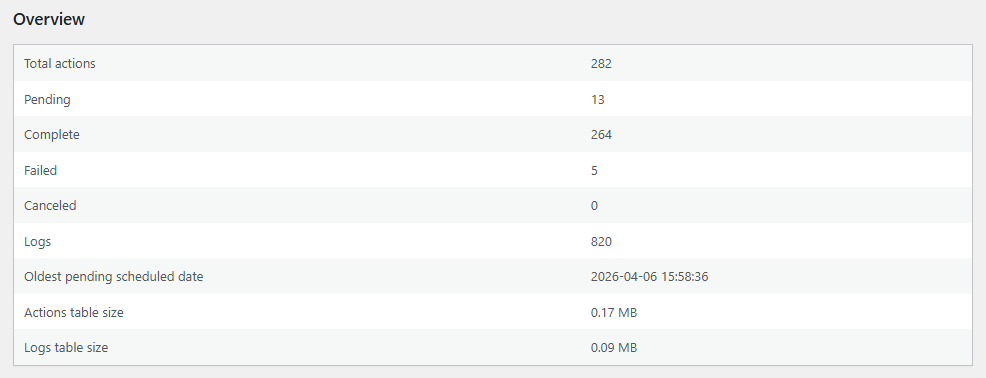
Plugnition Smart Action Scheduler Management for WooCommerce
Plugnition Smart Action Scheduler Management for WooCommerce helps you monitor, manage, and safely clean Action Scheduler data before it turns into a performance problem. If your WooCommerce store accumulates large numbers of completed, failed, canceled, or stuck scheduled actions, this plugin gives you a simple control panel to understand what is happening and clean things up safely.
WooCommerce relies on Action Scheduler for many background tasks, including emails, subscriptions, imports, sync jobs, and other automated processes. Over time, those scheduled actions can build up and clutter the database. This plugin helps you keep that queue under control with cleanup tools, queue insights, and safety-focused settings designed for real stores.
Why use this plugin?
Large Action Scheduler tables can quietly slow down your WooCommerce site, increase backup sizes, and make database maintenance harder. Plugnition Smart Action Scheduler Management gives you a lightweight way to review queue health, identify bloated tables, and remove old unnecessary actions without touching active pending jobs.
Main features
- View total Action Scheduler activity in one place
- See counts for pending, completed, failed, and canceled actions
- View Action Scheduler log totals
- Check the oldest pending scheduled action
- Estimate Action Scheduler table sizes
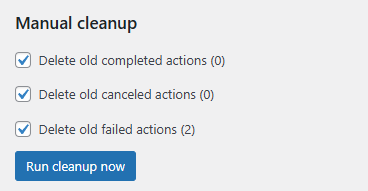
- Run manual cleanup for old completed, failed, and canceled actions
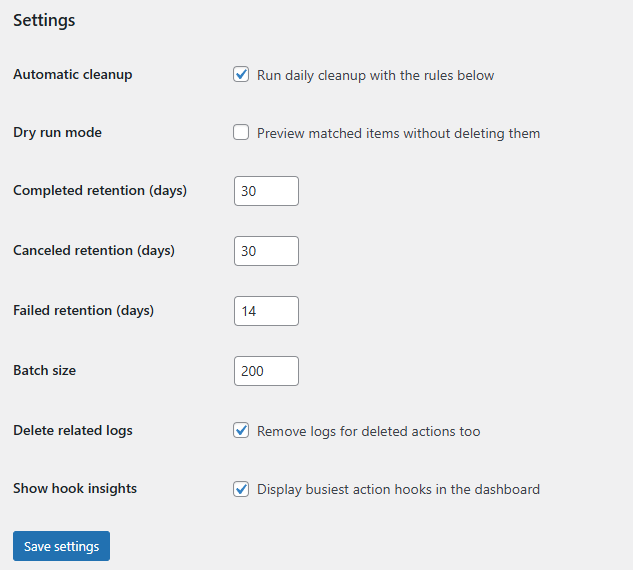
- Use dry-run mode before deleting anything
- Control the cleanup batch size for safer execution on shared hosting
- Optionally delete related logs when actions are removed
- Enable automatic daily cleanup
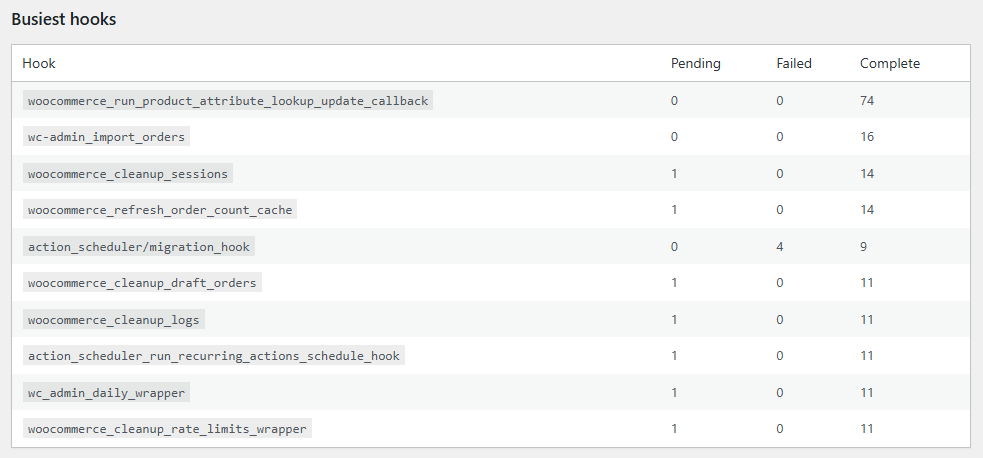
- Review the busiest hooks to spot heavy or problematic background jobs
- Retry failed actions from the dashboard
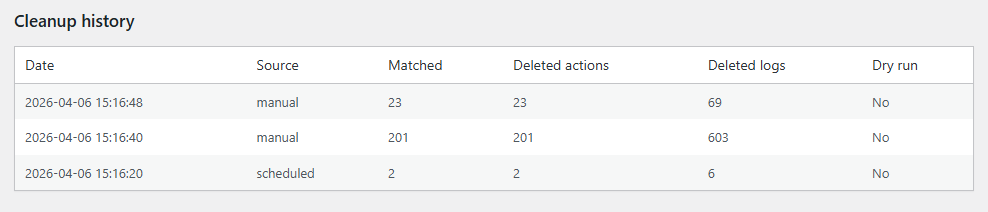
- Keep a cleanup history log for visibility and accountability
Built for safe cleanup
This plugin is designed to avoid risky cleanup behavior. It does not delete pending or in-progress actions. Instead, it focuses on old completed, failed, and canceled actions that often accumulate over time and provide little ongoing value. With dry-run mode enabled, you can preview how many rows match your rules before you delete anything.
Useful for growing WooCommerce stores
If your store uses several WooCommerce extensions, automations, or integrations, Action Scheduler activity can grow quickly. This plugin is especially useful for stores that process lots of background tasks and want a clearer view of what is filling the queue. It helps store owners and developers identify possible trouble spots before they affect site performance.
Simple, lightweight, practical
Like other Plugnition plugins, this plugin focuses on solving one real WooCommerce problem without unnecessary complexity. You get a clean admin interface, practical settings, and tools that are useful on everyday WooCommerce sites.
Ideal use cases
- WooCommerce stores with very large Action Scheduler tables
- Sites with many failed scheduled actions
- Stores running several background-processing plugins
- Developers maintaining WooCommerce sites for clients
- Shop owners who want better visibility into background jobs
Take control of your Action Scheduler queue
Plugnition Smart Action Scheduler Management for WooCommerce gives you a smarter way to monitor queue health, remove old clutter, and keep your WooCommerce background processing system cleaner and easier to manage.
Manual cleanup
Cleanup history
Busiest hooks
Failed action tools

Settings
Frequently Asked Questions
What is WooCommerce Action Scheduler?
Action Scheduler is a background-processing system used by WooCommerce and many of its extensions to run scheduled tasks such as sending emails, processing subscriptions, synchronizing data, and handling imports.
What does the plugin help me manage?
The plugin provides an overview of pending, completed, failed, and canceled actions, along with log totals, estimated table sizes, the oldest pending action, and the busiest scheduled hooks.
Can the plugin safely clean old scheduled actions?
Yes. You can remove old completed, failed, and canceled actions based on your cleanup settings. The plugin does not delete pending or in-progress actions.
What is dry-run mode?
Dry-run mode previews how many actions and logs match your cleanup rules without deleting anything. It allows you to review the expected results before performing the actual cleanup.
Can I control how many actions are removed at once?
Yes. You can configure the cleanup batch size to process deletions in smaller groups, which can be especially useful on shared hosting or stores with very large Action Scheduler tables.
Can the plugin also remove related Action Scheduler logs?
Yes. You can optionally delete the corresponding log entries when old scheduled actions are removed, helping reduce unnecessary database data further.
Can Action Scheduler cleanup run automatically?
Yes. The plugin includes an optional automatic daily cleanup feature. You can configure the cleanup rules and let the plugin regularly remove eligible old actions.
Can I retry failed scheduled actions?
Yes. The failed-action tools allow you to retry failed actions directly from the plugin dashboard. However, it is a good idea to investigate recurring failures, as they may indicate a problem with the plugin or integration that created the action.
How can I identify plugins generating excessive scheduled actions?
The Busiest Hooks report shows which Action Scheduler hooks have generated the most activity. Hook names can often help you identify the WooCommerce extension, integration, or custom process responsible for a large number of actions.
Does the plugin keep a record of cleanups?
Yes. The cleanup history records previous cleanup operations, helping administrators and developers see when cleanups were performed and what was removed.
Will cleaning Action Scheduler data speed up my store?
Removing a large amount of obsolete Action Scheduler data can reduce database size, backup size, and maintenance overhead. The performance impact will depend on your store, database size, hosting environment, and the underlying cause of excessive scheduled actions.
Should I back up my database before running a cleanup?
Yes. Although the plugin includes safety-focused controls and dry-run mode, creating a current database backup before deleting a large amount of data is always recommended.
Reviews
There are no reviews yet.