Customer statements are an essential part of managing business-to-business (B2B) sales, wholesale customers, and businesses that offer payment terms. A customer statement provides a clear overview of invoices, payments, outstanding balances, and account activity, making it easier for both merchants and customers to track what is owed.
While WooCommerce stores orders and payments, it does not include a built-in customer statement feature. Fortunately, you can create professional customer statements with the right approach.
- What Is a Customer Statement?
- Why Customer Statements Matter
- Does WooCommerce Include Customer Statements?
- What Should a WooCommerce Customer Statement Include?
- Option 1: Export WooCommerce Orders
- Option 2: Use an Accounts Receivable Plugin
- How to Create Customer Statements with WooCommerce Accounts Receivable
- Benefits of Customer Statements
- Best Practices for WooCommerce Customer Statements
- Frequently Asked Questions
- Conclusion
What Is a Customer Statement?
A customer statement is a document that summarizes a customer’s account over a specific period. It typically includes:
- Customer information
- Statement date
- Opening balance
- Orders or invoices
- Payments received
- Credits or adjustments
- Outstanding balance
Customer statements help customers verify their account history and understand exactly what they owe.
Why Customer Statements Matter
Customer statements are particularly useful if you:
- Sell to wholesale or B2B customers
- Offer Net 15, Net 30, or Net 60 payment terms
- Allow customers to pay multiple orders together
- Accept bank transfers or offline payments
- Need to remind customers about overdue balances
Regular statements reduce confusion, minimize payment disputes, and often help customers pay outstanding invoices faster.
Does WooCommerce Include Customer Statements?
No.
WooCommerce records orders and payments, but it does not provide a dedicated customer statement or accounts receivable system. There is no built-in page where customers can view their running balance or print an account statement.
If you only accept immediate online payments, this may not be an issue. However, stores that invoice customers or offer credit terms typically require additional functionality.
What Should a WooCommerce Customer Statement Include?
A useful customer statement should contain:
| Section | Description |
|---|---|
| Customer details | Name, company, and billing information |
| Statement period | Date range covered by the statement |
| Opening balance | Balance carried forward from the previous period |
| Transactions | Orders, invoices, payments, credits, and adjustments |
| Running balance | The customer’s updated balance after each transaction |
| Outstanding amount | The total amount currently owed |
| Payment instructions | Bank details or available payment methods |
The more transparent the statement is, the easier it is for customers to reconcile their accounts.
Option 1: Export WooCommerce Orders
One approach is to export a customer’s orders into a spreadsheet or PDF.
This works reasonably well for stores that:
- Have few repeat customers
- Do not offer payment terms
- Only need occasional reports
However, exported order lists usually do not calculate customer balances or combine multiple payments into a true account statement.
Option 2: Use an Accounts Receivable Plugin
If your customers regularly purchase on account, an accounts receivable solution is a much better option.
Instead of treating every order separately, an accounts receivable system maintains a running balance for each customer and records payments independently from orders.
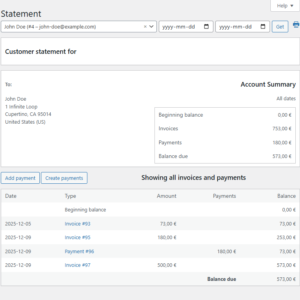
This allows you to generate accurate customer statements showing:
- Previous balance
- New orders
- Customer payments
- Credits and adjustments
- Remaining balance
Many stores also allow customers to review their statements directly from the WooCommerce My Account page.
If you need customer statements in WooCommerce, you can get started with the free WooCommerce Accounts Receivable plugin, which lets you track customer balances, record payments, and view customer account activity.
How to Create Customer Statements with WooCommerce Accounts Receivable
The WooCommerce Accounts Receivable plugin helps you track customer balances, record payments, and provide customers with an account statement.
After installing and activating the plugin, you can:
- Track the current balance of each customer
- Record payments received outside WooCommerce
- Review customer orders and payment activity
- Display statements in the customer’s My Account area
- Monitor unpaid and overdue balances
Step 1: Install and Activate the Plugin
Install the WooCommerce Accounts Receivable plugin and activate it from the WordPress Plugins page.
Step 2: Review Customer Balances
Open the relevant customer account in your WordPress admin area. The plugin allows you to review the customer’s current balance and account activity.
Step 3: Record Customer Payments
When a customer pays by bank transfer, cash, cheque, or another offline method, record the payment in the plugin. The payment will reduce the customer’s outstanding balance.
Step 4: Review the Customer Statement
The customer statement displays orders, payments, and the resulting account balance in chronological order. This creates a clear record that both the store owner and the customer can review.
Step 5: Give Customers Access to Their Statements
Customers can review their statement from the WooCommerce My Account area, reducing the need to request account information manually.
Benefits of Customer Statements
Implementing customer statements can provide several advantages:
- Improve cash flow
- Reduce overdue payments
- Simplify customer account reconciliation
- Reduce support requests
- Make B2B sales more professional
- Help customers identify unpaid invoices
Customers appreciate having a single statement that summarizes their account instead of searching through dozens of individual orders.
Best Practices for WooCommerce Customer Statements
When generating customer statements, consider the following recommendations:
- Send or update statements on a regular schedule, such as weekly or monthly.
- Clearly display the statement period.
- Include all payments, credits, and adjustments.
- Show the current outstanding balance prominently.
- Include clear payment instructions.
- Use consistent formatting so statements are easy to read.
- Include related WooCommerce order numbers for easier reconciliation.
If you allow customers to pay multiple invoices together, include references to the related orders so they can easily match payments to purchases.
Frequently Asked Questions
Can WooCommerce generate customer statements?
Not by default. WooCommerce stores order information but does not include a dedicated customer statement or accounts receivable feature.
What is the difference between an invoice and a customer statement?
An invoice requests payment for a single order, while a customer statement summarizes the customer’s entire account activity over a specific period.
Can customers view their statements online?
Yes. With the appropriate plugin, customers can access their account statements from the WooCommerce My Account page instead of requesting them manually.
Are customer statements useful for B2B stores?
Yes. Businesses that offer payment terms, wholesale pricing, or customer credit accounts typically rely on statements to keep customers informed about their outstanding balances.
Can a customer statement include offline payments?
Yes. An accounts receivable plugin can record bank transfers, cash payments, cheques, and other payments received outside the standard WooCommerce checkout process.
How often should customer statements be provided?
Monthly statements are common, but businesses with frequent transactions or shorter payment terms may provide them weekly.
Conclusion
Customer statements help merchants and customers maintain accurate financial records while making payment tracking significantly easier. Although WooCommerce does not include this functionality by default, adding customer statements can streamline collections, improve customer communication, and provide a more professional purchasing experience.
If your store sells to wholesale customers or allows payment on account, implementing customer statements is one of the most effective ways to improve your accounts receivable workflow.
Learn more about WooCommerce Accounts Receivable and start tracking customer balances and payments directly in WooCommerce.
Recommended Plugins
-
WooCommerce Accounts Receivable
Track customer balances and unpaid orders directly in WooCommerce.
-
WooCommerce Deferred Revenue Tracker
Track deferred revenue for WooCommerce products, generate monthly recognition schedules, backfill schedules for historical orders, adjust future entries on refunds, and export accounting-ready CSV reports.
-
WooCommerce Tax Liability Dashboard
Track WooCommerce tax liability by country, period, and order status with a clear, lightweight admin dashboard and CSV export.