Keeping the right amount of stock is one of the most difficult parts of running an online store. If you order too little, popular products may become unavailable, and you may lose sales. If you order too much, money becomes tied up in products that may take months to sell.
WooCommerce can track your current stock quantities and notify you when inventory reaches a predefined threshold. However, a fixed low-stock threshold does not consider how quickly each product is selling or how long it takes your supplier to deliver new stock.
Inventory demand forecasting provides a more practical solution. By analyzing recent sales and comparing them with current stock levels, you can estimate how long your inventory will last and decide when products should be reordered.
What Is Inventory Demand Forecasting?
Inventory demand forecasting is the process of estimating how much of a product customers are likely to purchase during a future period.
For a WooCommerce store, this normally involves analyzing:
- Recent product sales
- Average units sold per day
- Current stock quantities
- Supplier delivery times
- Seasonal changes in demand
- Promotions and other unusual sales events
The purpose of forecasting is not necessarily to predict the exact number of units that will be sold. Instead, it gives you a reasonable estimate that can support better purchasing and restocking decisions.
For example, suppose a product has 60 units in stock and sells an average of three units per day. If sales continue at approximately the same rate, the current inventory should last around 20 days.
This information is more useful than simply knowing that 60 units are available. It tells you how urgently the product may need to be reordered.
Why Forecast Inventory Demand in WooCommerce?
WooCommerce inventory forecasting can help you balance two competing risks: stockouts and excess inventory.
Prevent avoidable stockouts
A product can have a seemingly healthy stock quantity while still being close to selling out. Twenty units may be sufficient for a slow-moving product but inadequate for an item that sells ten units per day.
Forecasting helps you identify fast-moving products before their stock reaches a standard low-stock threshold.
Reduce excess inventory
Ordering too much inventory can create storage costs and reduce available cash. It may also increase the risk of products becoming outdated, damaged, or difficult to sell.
Demand forecasts help you order according to expected sales instead of purchasing the same quantity for every product.
Plan purchases around supplier lead times
If a supplier needs 14 days to deliver an order, receiving a warning when only five days of stock remain is too late.
A useful restocking process compares the predicted number of stock days remaining with the supplier’s lead time.
Prioritize purchasing decisions
Stores with large catalogs may not have time to inspect every product individually. Forecasting allows store managers to focus first on products that are selling quickly or approaching their reorder date.
Make decisions using sales data
Without forecasting, restocking decisions may be based on guesswork or occasional stock checks. Forecasting provides a repeatable process based on actual WooCommerce order data.
A Simple Inventory Forecasting Formula
A basic inventory forecast can be created using three values:
- The number of units sold during a selected period
- The number of days in that period
- The product’s current stock quantity
First, calculate the product’s average daily sales:
Average daily sales = Units sold during the period ÷ Number of days
Next, calculate how many days the current stock may last:
Days of stock remaining = Current stock quantity ÷ Average daily sales
Example
Suppose a product sold 90 units during the previous 30 days and currently has 45 units in stock.
Average daily sales:
90 ÷ 30 = 3 units per day
Estimated stock remaining:
45 ÷ 3 = 15 days
If demand remains similar, the product may run out of stock in approximately 15 days.
This is a simple forecasting method, but it can be effective for stores with relatively consistent sales.
How to Calculate Average Daily Sales
The period used to calculate average daily sales can significantly affect the result.
Short forecasting periods
A period such as the previous seven or 14 days responds quickly to changes in demand. It can be useful for fast-moving products, promotions, or stores whose sales change rapidly.
However, a short period may produce unstable forecasts. One unusually large order could significantly increase the calculated daily sales rate.
Long forecasting periods
A period such as 60 or 90 days produces a smoother average. It may be more suitable for products with irregular or infrequent sales.
The disadvantage is that the forecast responds more slowly when demand changes.
A practical starting point
For many WooCommerce stores, the previous 30 days provide a reasonable starting point. This period is recent enough to reflect current sales while being long enough to reduce the impact of individual orders.
You can adjust the period after comparing forecasts with actual results.
How to Estimate Days of Stock Remaining
Once you know the average daily sales rate, divide the current stock quantity by that rate.
Consider these three products:
| Product | Current Stock | Average Daily Sales | Estimated Days Remaining |
|---|---|---|---|
| Product A | 100 | 2 | 50 days |
| Product B | 60 | 5 | 12 days |
| Product C | 25 | 0.5 | 50 days |
Product B does not have the lowest stock quantity, but it requires attention first because it is selling much faster than the other products.
This demonstrates why current stock alone is not enough to determine restocking priority.
How to Include Supplier Lead Time
Supplier lead time is the number of days between placing a purchase order and receiving stock that is ready to sell.
To avoid a stockout, a product should normally be reordered before its predicted stock duration falls below the supplier lead time.
A simple calculation is:
Days until reorder = Days of stock remaining − Supplier lead time
Example
Suppose a product has:
- 20 days of stock remaining
- A supplier lead time of 14 days
The calculation is:
20 − 14 = 6 days until reorder
This means you have approximately six days before the order should be placed.
If the product has only ten days of stock remaining and the supplier needs 14 days to deliver it, the reorder point has already been passed. You may need to order immediately or ask the supplier about faster delivery.
Add a safety-stock buffer
Forecasts are estimates, and supplier deliveries can be delayed. You can reduce this risk by adding a safety-stock buffer.
For example, with a 14-day supplier lead time and a five-day safety buffer, you would plan to reorder when approximately 19 days of stock remain.
Reorder threshold = Supplier lead time + Safety-stock days
How to Forecast WooCommerce Inventory Manually
You can create a basic inventory forecast manually using WooCommerce reports and a spreadsheet.
- Choose a sales analysis period, such as the previous 30 days.
- Find the number of units sold for each product during that period.
- Divide the units sold by the number of days in the period.
- Record the product’s current stock quantity.
- Divide current stock by average daily sales.
- Compare the estimated stock duration with the supplier lead time.
- Mark products that need to be reordered soon.
A spreadsheet could contain the following columns:
- Product name
- SKU
- Current stock
- Units sold
- Analysis period
- Average daily sales
- Predicted days remaining
- Supplier lead time
- Recommended reorder date
This approach may work for a small catalog, but it becomes time-consuming as the number of products increases. Forecasts also become outdated whenever new orders are placed or stock quantities change.
How to Automate Inventory Forecasting in WooCommerce
Instead of exporting sales data and updating formulas manually, you can automate the process with the WooCommerce Restock Prediction & Alerts plugin.
The plugin analyzes recent WooCommerce sales, calculates an estimated daily sales rate, and compares it with the current stock quantity. It then predicts how many days of inventory remain for each tracked product.
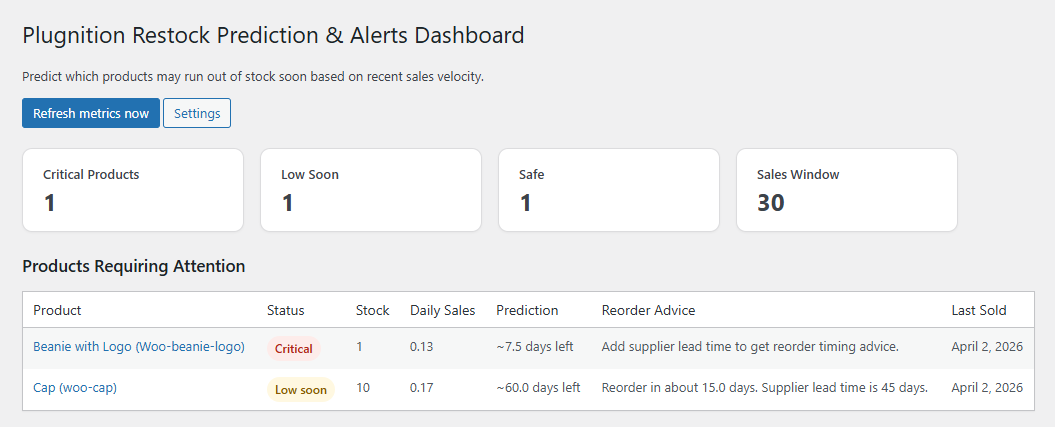
Its forecasting and stock-management features include:
- Estimated days of stock remaining
- Average daily sales metrics
- Safe, Low Soon, Critical, and Out of Stock risk statuses
- Prediction data in the WooCommerce product list
- Sorting by predicted stock duration or daily sales
- A centralized overview of products requiring attention
- Supplier lead-time support
- Practical reorder timing recommendations
- Optional tracking for product variations
- Optional refund-aware sales calculations
- Manual daily sales overrides for unusual products
- Email alerts for products at risk of selling out
This gives store managers a continuously updated view of inventory risk without maintaining a separate forecasting spreadsheet.
Review products by urgency
Risk labels make it easier to separate healthy products from those that may need immediate attention. Instead of reviewing your full product catalog, you can start with products marked as critical or likely to run low soon.
Use lead times to determine when to order
Entering a supplier lead time turns a basic depletion estimate into a more actionable restocking recommendation. You can see whether a product should be reordered now or how much time remains before ordering becomes necessary.
Track variations separately
Variable products can create additional inventory challenges. A product may appear to have adequate overall inventory while a popular size, color, or other variation is close to selling out.
Variation-level tracking helps you identify these risks before an individual option becomes unavailable.
Use manual overrides when historical sales are misleading
Historical averages are not always appropriate. A new campaign, recurring wholesale order, discontinued promotion, or known seasonal change may make recent sales an unreliable predictor.
In these situations, a manual daily sales value can provide a more realistic forecast.
How to Improve Forecast Accuracy
No inventory forecast will be perfect, but several practices can make your estimates more useful.
Use completed and processing orders
Base demand calculations on order statuses that represent genuine sales. Including failed, canceled, or unpaid orders may overstate demand.
Account for refunds
If products are frequently returned, decide whether refunded quantities should be deducted from sales calculations. The appropriate choice depends on whether returned products can be placed back into sellable inventory.
Review seasonal products separately
A 30-day average may not predict demand for holiday products, summer products, or other seasonal items. Compare current demand with the same period in a previous year when sufficient historical data is available.
Adjust forecasts before promotions
Past sales may underestimate demand during an upcoming sale, advertising campaign, or product launch. Increase the expected daily sales rate when you know demand is likely to rise.
Separate unusual bulk orders
A single large wholesale order can distort the average for a product that normally sells in small quantities. Review large orders before relying on a short forecasting period.
Check stock accuracy
A forecast can only be as reliable as its input data. Regularly verify that physical inventory matches the quantities recorded in WooCommerce.
Evaluate forecasts regularly
Compare previous predictions with actual sales. If products consistently sell out earlier than expected, consider using a shorter analysis period or adding a larger safety buffer.
Common Inventory Forecasting Mistakes
Using the same low-stock threshold for every product
A fixed threshold ignores differences in sales velocity and supplier lead time. Ten remaining units may be safe for one product and critical for another.
Ignoring supplier delivery time
Knowing that a product will sell out in 12 days is not enough when replenishment takes three weeks.
Relying on outdated sales averages
Customer demand changes over time. Forecasts based on old data may not reflect current purchasing behavior.
Treating forecasts as guarantees
Unexpected demand, supplier delays, inventory errors, and large orders can all affect the result. Use predictions as decision-support tools rather than exact promises.
Ignoring products with low stock but no recent sales
A product with no recent sales cannot produce a meaningful sales-velocity forecast. However, it may still need attention if it is seasonal, newly launched, or expected to be promoted soon.
Failing to update forecasts automatically
A manually prepared spreadsheet becomes less accurate as new orders arrive. Forecasting is most useful when calculations are refreshed regularly.
Conclusion
WooCommerce provides the stock quantities needed for inventory management, but current stock alone does not tell you when a product is likely to sell out.
A simple demand forecast combines recent units sold, average daily sales, current inventory, and supplier lead time. This allows you to estimate how long stock may last and identify the products that should be reordered first.
You can perform these calculations manually, but maintaining forecasts for a growing catalog can require substantial time. The WooCommerce Restock Prediction & Alerts plugin automates the process by calculating sales velocity, predicting stock depletion, assigning risk statuses, and providing practical restocking information directly in WooCommerce.
By reviewing inventory risks before products sell out, you can reduce missed sales, avoid unnecessary emergency orders, and make purchasing decisions with greater confidence.
Recommended Plugins
-
WooCommerce Product Expiration Dates
Set expiration dates for WooCommerce products and automatically expire them by date.
-
WooCommerce Restock Prediction & Alerts
Predict which WooCommerce products may run out of stock soon based on recent sales and alert store admins before stockouts happen.
-
WooCommerce Sales Forecast
Predict future sales with confidence using proven forecasting methods based on real order data.