
Plugnition Order Timeline for WooCommerce
Plugnition Order Timeline for WooCommerce adds a clear, organized timeline to each WooCommerce order, helping store managers quickly understand what happened, when it happened, and why it matters.
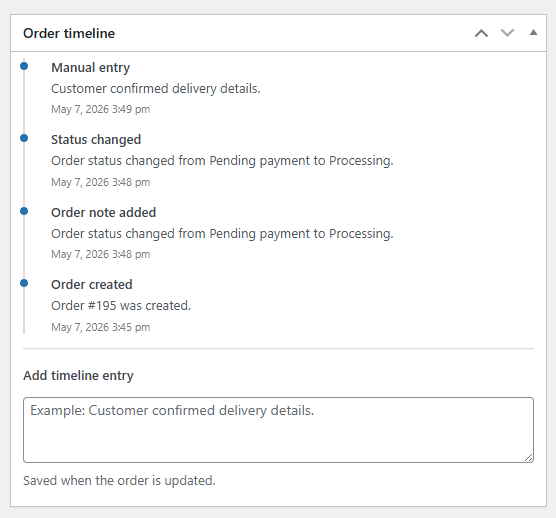
Instead of checking multiple areas of the order screen, your team can view important order activity in one simple timeline, including order creation, status changes, order notes, and manual internal updates.
Key Features
- Order timeline panel: Adds a clean timeline directly to the WooCommerce order edit screen.
- Status change tracking: Automatically records when an order status changes.
- Order creation event: Logs when a new order is created.
- Order note tracking: Adds order note activity to the timeline for better visibility.
- Manual timeline entries: Let staff add custom internal updates, reminders, or context.
- HPOS compatible: Built to work with WooCommerce High-Performance Order Storage.
- Simple admin UI: Keeps order history easy to scan without cluttering the screen.
- Lightweight design: No unnecessary settings, dashboards, or complex configuration.
Why Use an Order Timeline?
WooCommerce orders often contain useful information, but it can be spread across order notes, status history, staff communication, and manual checks. Plugnition Order Timeline brings that activity together into a single chronological view.
This makes it easier to review customer service cases, understand fulfillment progress, track internal actions, and give your team better context before updating an order.
Perfect For
- Stores with multiple staff members managing orders
- WooCommerce shops that need clearer internal order history
- Customer support teams reviewing order activity
- Fulfillment teams tracking progress and manual updates
- Store owners who want a simpler way to understand order changes
Manual Internal Entries
Staff can add custom timeline entries directly from the order screen. This is useful for recording important internal notes such as delivery confirmations, customer follow-ups, payment checks, fulfillment updates, or special handling instructions.
Built for WooCommerce Admin Workflows
Plugnition Order Timeline for WooCommerce is designed to fit naturally into the WooCommerce order management screen. It keeps the timeline close to the order details, so store managers can review important context without leaving the order page.
Lightweight and Easy to Use
The plugin is intentionally simple. There are no complicated settings or setup steps. Install it, activate it, and the timeline becomes available on your WooCommerce order edit screens.
Make Order History Easier to Understand
Plugnition Order Timeline for WooCommerce gives your team a better way to follow the story of each order, reduce confusion, and manage customer orders with more confidence.
Frequently Asked Questions
What information does the order timeline display?
The timeline displays important order activity in chronological order, including order creation, status changes, order notes, and manual timeline entries added by your staff.
Where is the order timeline displayed?
The timeline is displayed directly on the WooCommerce order edit screen, allowing your team to review an order’s history without leaving the order page.
Can staff add custom entries to the timeline?
Yes. Staff members can add manual timeline entries for customer follow-ups, delivery confirmations, payment checks, fulfillment updates, special handling instructions, and other internal information.
Are manual timeline entries visible to customers?
No. Manual timeline entries are intended for internal use by store administrators and staff managing the order.
Does the plugin automatically track order status changes?
Yes. The plugin automatically records WooCommerce order status changes, making it easier to see how an order progressed over time.
Does the plugin require any configuration?
No complicated setup is required. Install and activate the plugin, and the timeline will become available on your WooCommerce order edit screens.
Is the plugin compatible with WooCommerce HPOS?
Yes. WooCommerce Order Timeline is compatible with High-Performance Order Storage (HPOS).
Who is this plugin useful for?
It is useful for store owners, customer support teams, and fulfillment staff who need a clear, centralized history of each order and its internal activity.
Reviews
There are no reviews yet.