
Split selected items from a WooCommerce order
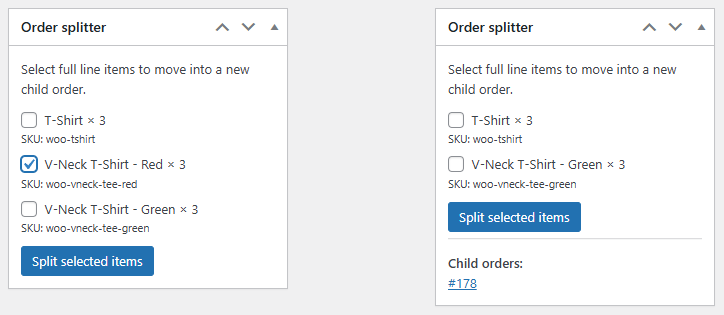
Need to ship available products while others are backordered? Plugnition Order Splitter lets you select items in an existing WooCommerce order and move them into a new, linked child order from the admin order screen. The remaining items stay in the original order, so you can manage each part separately. You can also use it when items ship from different warehouses or require separate fulfillment.
Why Use Order Splitter for WooCommerce?
WooCommerce does not include a simple built-in way to split an order into multiple orders. When part of an order needs to be shipped separately, handled by another supplier, or delayed due to stock availability, store admins often have to work around the limitation manually.
This plugin gives you a clean admin-side tool to split order items while keeping a clear relationship between the original parent order and the newly created child order.
Key Features
- Split selected order items into a new WooCommerce order.
- Create child orders directly from the order edit screen.
- Preserve customer details, billing address, shipping address, currency, and payment method.
- Keep parent and child orders linked for easy tracking.
- Add automatic order notes to document the split history.
- Recalculate order totals after splitting items.
- Admin-only workflow designed for store managers and fulfillment teams.
- Lightweight implementation using WooCommerce CRUD methods.
Perfect For
- Partial shipments
- Backordered products
- Supplier-based fulfillment
- Multi-package orders
- Warehouse workflows
- Stores that need cleaner order organization
How It Works
- Open a WooCommerce order in the admin area.
- Select the items you want to move into a new order.
- Click the split order button.
- The plugin creates a new child order with the selected items.
- The original order and child order are linked with order notes for traceability.
Want to see the process step by step? Read our guide to splitting a WooCommerce order, including what to check after the split.
Parent and Child Order Tracking
After splitting an order, the original order keeps a reference to the new child order, and the child order stores a reference back to the parent order. This makes it easy to understand where each order came from and how the fulfillment process was divided.
Lightweight and Admin-Focused
We’ve built the Plugnition Order Splitter for WooCommerce to do one job clearly: help admins split order items into a separate order. It avoids unnecessary frontend features, complicated workflows, and heavy interfaces.
Make WooCommerce Order Management Easier
Whether you need to separate backordered items, prepare multiple shipments, or divide orders by fulfillment process, Plugnition Order Splitter for WooCommerce gives your store a simple and reliable way to split orders from the admin area.
Frequently Asked Questions
What does the WooCommerce Order Splitter plugin do?
The plugin lets store administrators move selected items from an existing WooCommerce order into a new child order directly from the order edit screen.
Can I choose which order items to split?
Yes. You can select the individual order items you want to move, while the remaining items stay in the original order.
What information is copied to the new order?
The child order retains essential information from the original order, including the customer details, billing and shipping addresses, currency, and payment method.
Are the original and new orders linked?
Yes. The original order stores a reference to the new child order, while the child order links back to its parent. Automatic order notes also document the split for easier tracking.
Are order totals recalculated after a split?
Yes. The plugin recalculates the totals of the original order and the newly created child order based on the items assigned to each one.
When is splitting an order useful?
Order splitting is useful for partial shipments, backordered products, supplier-based fulfillment, multiple packages, warehouse workflows, or any situation where some items must be processed separately.
Can customers split their own orders?
No. Order splitting is an admin-only feature intended for store managers, administrators, and fulfillment teams.
Does the plugin support WooCommerce HPOS?
Yes. WooCommerce Order Splitter is compatible with High-Performance Order Storage (HPOS).
Reviews
There are no reviews yet.