
Plugnition Deferred Revenue Tracker for WooCommerce
Automatically spread WooCommerce revenue over time and generate accounting-ready deferred revenue reports.
WooCommerce Deferred Revenue Tracker helps store owners handle one of the most frustrating accounting tasks in eCommerce: revenue recognition. If you sell annual plans, prepaid services, support packages, memberships, licenses, or other time-based products, this plugin lets you defer revenue and recognize it gradually instead of treating everything as income immediately.
Instead of managing spreadsheets manually, you can define deferred revenue rules directly on WooCommerce products, generate recognition schedules automatically when orders are completed, and review recognized revenue and deferred balances from your WordPress admin area.
Why use this plugin?
WooCommerce is great for selling products, but it does not provide built-in tools for tracking deferred revenue. Therefore, many store owners and accountants end up doing the work manually outside WordPress, which is slow, repetitive, and error-prone.
This plugin gives you a simple and lightweight way to bring that process into WooCommerce. It is especially useful for businesses that sell services or digital products that should be recognized over a period of time rather than all at once.
Main features
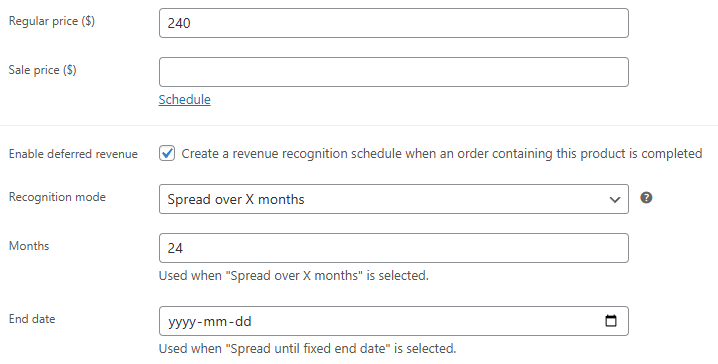
- Per-product deferred revenue settings – choose whether a product should be recognized immediately or deferred over time.
- Flexible recognition methods – defer revenue over a selected number of months or use a fixed start and end date range.
- Automatic schedule creation – the plugin generates revenue schedules automatically when an order is marked completed.
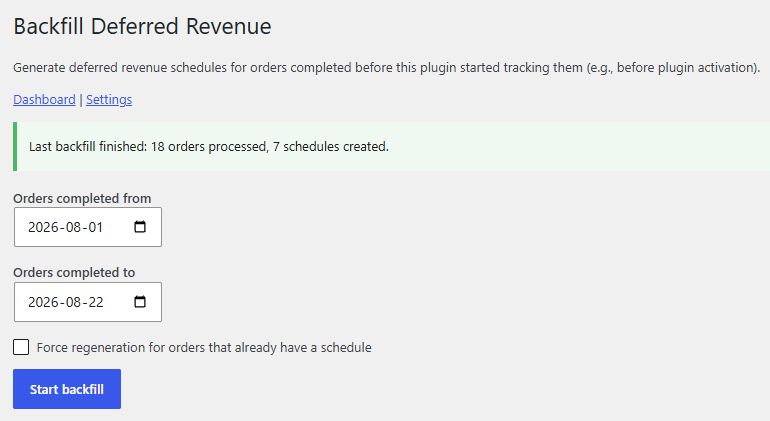
- Historical order backfill – generate deferred revenue schedules for eligible orders completed before the plugin was installed or configured.
- Subscription-aware revenue recognition – create deferred revenue schedules based on the subscription’s next payment date instead of the original order date, ensuring revenue recognition aligns with the actual billing period. Compatible with the WooCommerce Subscriptions plugin.
- Accounting-focused revenue breakdown – split order revenue into smaller recognition periods for cleaner tracking.
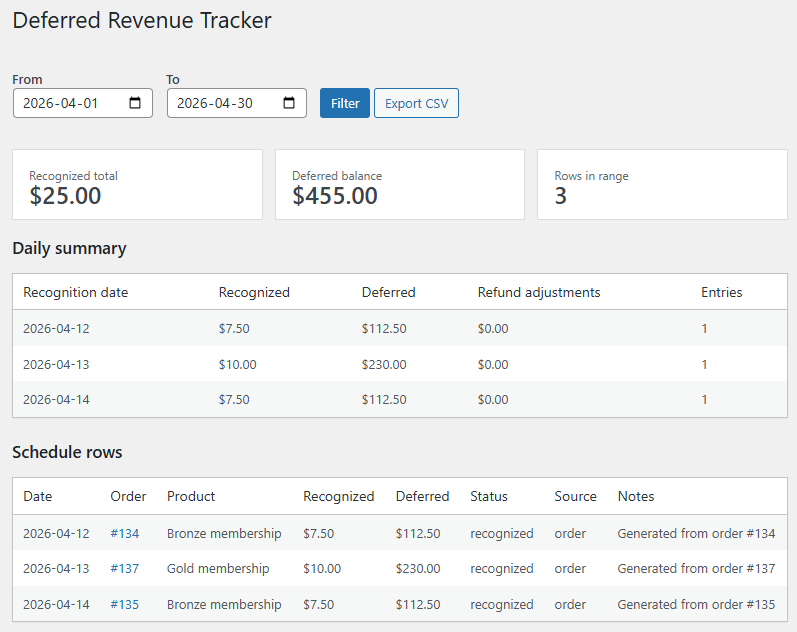
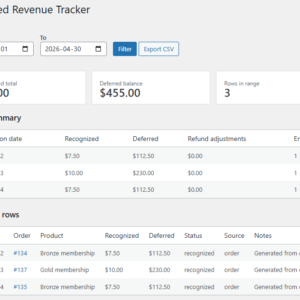
- Deferred revenue reports – review recognized revenue, deferred balances, and schedule data in the WooCommerce admin area.
- CSV export – export report data for accounting review or external processing.
- Refund adjustments – reduce future recognition entries automatically when refunded orders are detected.
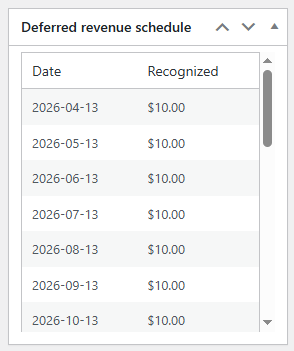
- Order-level schedule visibility – view deferred revenue schedule information directly on the WooCommerce order edit screen.
- Lightweight and practical – focused on core functionality without unnecessary complexity.
How it works
- Enable deferred revenue tracking on a WooCommerce product.
- Choose how the plugin should recognize revenue: over a defined number of months, or across a fixed date range.
- When a customer purchases the product, and the order is completed, the plugin automatically creates a revenue recognition schedule.
- As time passes, you can review the scheduled amounts on the report screen.
- If a refund happens, the plugin adjusts future schedule entries to reflect the change.
Revenue Recognition for WooCommerce Subscriptions
When using WooCommerce Subscriptions, the initial order date doesn’t always represent the start of the billing period. In many businesses, revenue should begin being recognized from the subscription’s next payment date instead.
Enable Use the subscription’s next payment date to automatically build deferred revenue schedules from the subscription’s upcoming billing cycle rather than the original order date. This provides more accurate revenue recognition for recurring subscriptions and renewals.
| Option | Schedule starts from | Best for |
|---|---|---|
| Order date | Original purchase date | Standard WooCommerce orders |
| Subscription’s next payment date | Next subscription billing date | WooCommerce Subscriptions stores recognizing revenue from each billing cycle |
Backfill Deferred Revenue for Historical Orders
If you install the plugin after your store has already processed eligible orders, you do not have to create their deferred revenue schedules manually.
The Backfill Deferred Revenue tool processes historical completed orders from a selected start date and creates any missing revenue recognition schedules using the deferred revenue settings configured for each product.
This is especially useful when migrating from spreadsheets, enabling deferred revenue tracking on an established store, or rebuilding historical accounting reports. Existing schedules are preserved, helping prevent duplicate deferred revenue entries.
Perfect for stores selling
- Annual service plans
- Prepaid support packages
- Membership access
- Software licenses
- Maintenance retainers
- Training packages
- Digital subscriptions
- Any product where income should be recognized gradually over time
We built the WooCommerce Deferred Revenue Tracker for real-world WooCommerce accounting workflows
We designed the Plugnition Deferred Revenue Tracker for WooCommerce for store owners who need a practical solution without enterprise-level complexity. It helps bridge the gap between WooCommerce order data and accounting processes by organizing deferred and recognized revenue in a structured, understandable way.
Whether you are preparing reports for your accountant, reviewing deferred balances internally, or simply trying to avoid manual spreadsheet work, this plugin gives you a much cleaner workflow.
Admin tools included
- Deferred revenue report page in WooCommerce
- Summary overview cards for quick totals
- Recognized revenue tracking
- Deferred balance visibility
- CSV export for external analysis
- Order admin metabox with schedule details
Simple, focused, and useful
Like all Plugnition plugins, we built this one to solve a clear problem with a focused feature set. It does not try to become a full accounting platform. Instead, it gives WooCommerce stores a clean way to manage deferred revenue tracking directly inside WordPress.
Who is this plugin for?
This plugin is a great fit for WooCommerce stores that need better financial visibility for time-based products and services. Therefore, it is especially useful for agencies, software sellers, service providers, membership businesses, consultants, and digital product stores.
Get better control over deferred revenue in WooCommerce
Stop tracking deferred revenue manually. Plugnition Deferred Revenue Tracker for WooCommerce helps you automatically create schedules, clearly view recognized and deferred amounts, and export data when needed — all from your WooCommerce admin.
Product settings
Enable/disable deferred revenue and configure how recognition dates are calculated for WooCommerce products.
Order schedule
Order-level schedule visibility: view each order’s deferred revenue schedule directly from the WooCommerce order screen. Quickly see recognition dates and recognized amounts without leaving the order details page.
Frequently Asked Questions
What is deferred revenue?
Deferred revenue (also called unearned revenue) is income you’ve received but haven’t earned yet because the product or service will be delivered over time. Instead of recognizing the full payment immediately, the revenue is recognized gradually according to a schedule.
Who is this plugin for?
This plugin is ideal for WooCommerce stores selling subscriptions, memberships, maintenance plans, service contracts, software licenses, warranties, online courses, or any other products that should be recognized over a period of time.
Does the plugin change WooCommerce orders or payments?
No. The plugin does not modify your WooCommerce orders, payments, or checkout process. It tracks deferred revenue separately and generates recognition schedules based on your settings.
Can I set different recognition periods for different products?
Yes. Each product can have its own deferred revenue settings, allowing you to recognize revenue over different time periods depending on what you sell.
What happens if an order is refunded?
The plugin updates the deferred revenue schedule to reflect the refunded amounts, helping keep your deferred and recognized revenue accurate.
Can I view the revenue schedule for a specific order?
Yes. The plugin adds a deferred revenue schedule to the WooCommerce order page, allowing you to see recognized revenue, remaining deferred amounts, and upcoming recognition dates.
Can I start deferred revenue schedules from the subscription renewal date?
Yes. When using WooCommerce Subscriptions, you can enable Use the subscription’s next payment date. The plugin will create deferred revenue schedules beginning from the subscription’s upcoming billing period instead of the original order date, making revenue recognition more closely match when the service period actually starts.
Can I generate deferred revenue schedules for historical orders?
Yes. The Backfill Deferred Revenue tool can process eligible completed orders from a selected start date and create missing deferred revenue schedules. This allows you to include orders placed before the plugin was installed or before deferred revenue tracking was enabled.
Can I export deferred revenue data?
Yes. The plugin lets you export deferred revenue schedules and reports, making it easy to share data with accountants or import it into other accounting systems.
Is the plugin compatible with High-Performance Order Storage (HPOS)?
Yes. WooCommerce Deferred Revenue Tracker is fully compatible with High-Performance Order Storage (HPOS).
Does this plugin replace accounting software?
No. The plugin helps track deferred revenue within WooCommerce, but it is not a replacement for accounting software. It is designed to simplify revenue recognition and provide accurate data for your accounting workflow.
Maria Galvez (verified owner) –
We had an excellent experience with Plugnition They truly went above and beyond to help us and ensure it worked exactly the way we needed it to.
Their responsiveness, technical expertise, and willingness to work through the details made a huge difference. We greatly appreciate the support and highly recommend them to anyone looking for a reliable, customer-focused developer.