
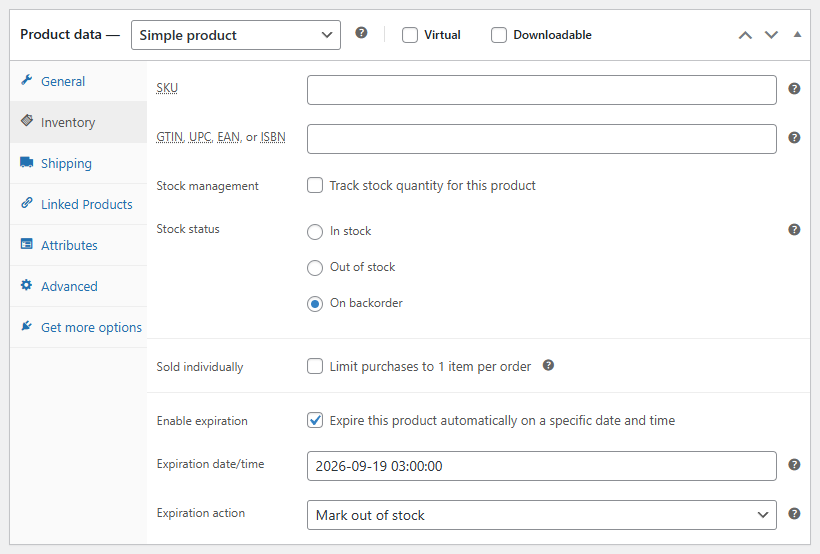
WooCommerce Product Expiration Dates allows store owners to set automatic expiration dates for WooCommerce products. When the expiration date is reached, the plugin can automatically change the product status, mark the product out of stock, or remove it from the catalog. This makes it easy to manage limited-time products, seasonal offers, temporary listings, and time-sensitive promotions.
WooCommerce does not include built-in product expiration functionality. This plugin adds a simple expiration system directly inside the WooCommerce product editor, allowing you to define exactly when a product should expire and what should happen afterward. The plugin can automatically set expired products to draft, make them private, move them to trash, or mark them as out of stock.
The plugin also helps maintain a clean store catalog by preventing customers from purchasing expired products and optionally hiding expired items from the shop page, category pages, and search results. An Expires On column in the WooCommerce products list lets administrators quickly see which products are scheduled to expire.
Key Features
- Set expiration dates and times for WooCommerce products
- Automatically expire products after a specific date
- Choose expiration actions: set product to draft, private, trash, or out of stock
- Automatically block purchases for expired products
- Optionally hide expired products from the WooCommerce catalog
- Expiration settings directly inside the WooCommerce product editor
- Admin column showing when each product expires
- Global settings to control default expiration behavior
Perfect For
- Seasonal WooCommerce products
- Limited-time product promotions
- Event tickets and time-based sales
- Temporary product listings
- Flash sale items
- Products with limited availability
WooCommerce Product Expiration Dates helps store owners automate catalog management, reduce manual work, and ensure customers never see or purchase products that should no longer be available.
Reviews
There are no reviews yet.