
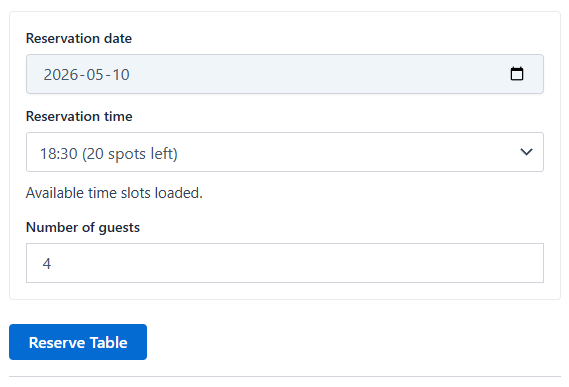
Plugnition Simple Table Reservations for WooCommerce gives you a lightweight way to accept table reservations directly through WooCommerce. Turn any product into a reservable table or reservation item, let guests choose a date, time, and guest count, and manage availability with simple per-slot capacity rules.
This plugin is built for restaurant owners, cafés, and food businesses that want a clean WooCommerce-based reservation flow without installing a large and complicated booking system. It keeps setup simple, works with familiar WooCommerce product settings, and helps you start taking reservations fast.
Why use this plugin?
Many booking plugins try to do everything. That often means complex setup, too many options, and a heavy interface. Plugnition Simple Table Reservations for WooCommerce takes a different approach. It focuses on the core reservation flow your business actually needs: choose a date, choose a time slot, enter the number of guests, and reserve.
Main features
- Enable table reservations on individual WooCommerce products
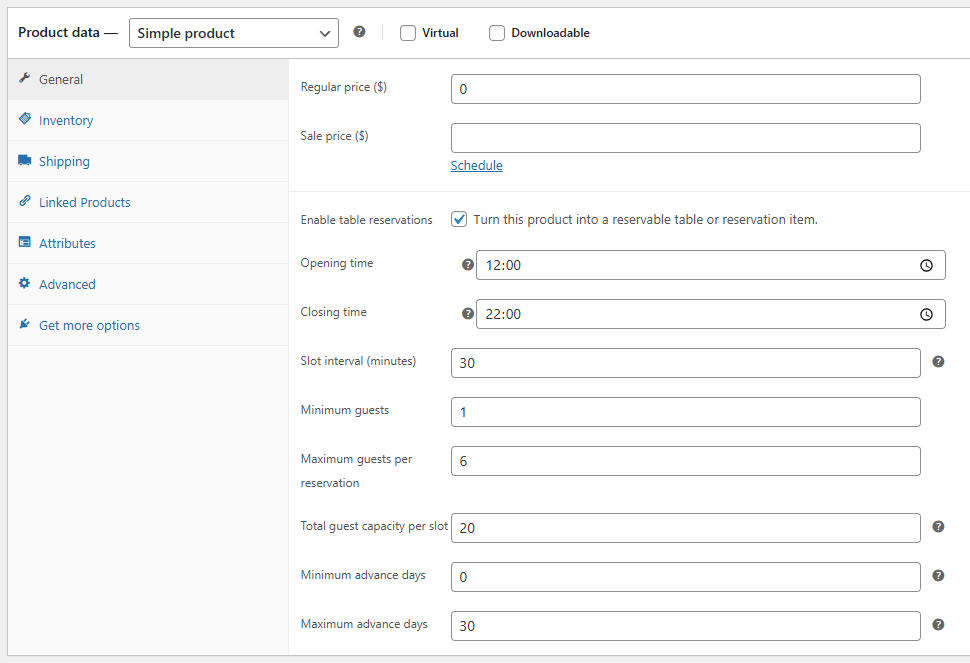
- Set opening and closing times for each reservable product
- Create reservation slots using your chosen time interval
- Set minimum and maximum guest counts per reservation
- Limit the total guest capacity for each time slot
- Control how far in advance reservations can be made
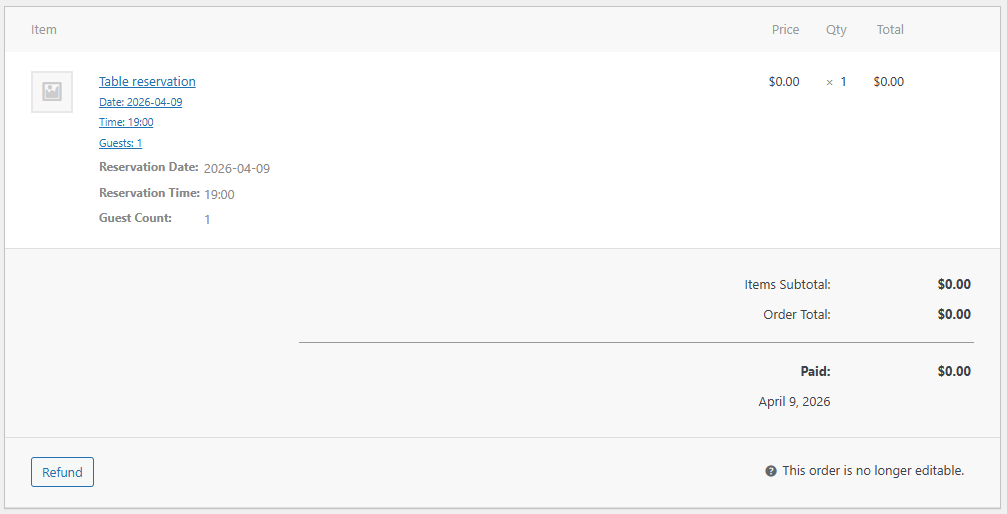
- Show reservation date, time, and guest details in the cart and order
- Replace the standard Add to Cart button text with Reserve Table
- Check slot availability before customers add reservations to the cart
Simple setup, practical control
After activating the plugin, you can open any WooCommerce product and enable reservations for it. From there, you can define your reservation hours, slot interval, guest limits, and total slot capacity. The plugin then shows a simple reservation form on the product page, where customers can select their preferred booking details.
When a guest chooses a date, the plugin loads available time slots for that day. It checks the selected number of guests and only shows slots with enough capacity left. This helps reduce overbooking and keeps the process clear for both you and your customers.
Built for WooCommerce-first stores
If your business already uses WooCommerce for food orders, event bookings, or local services, this plugin fits naturally into your store. You do not need a separate reservation platform or a disconnected booking workflow. Reservations move through WooCommerce just like the rest of your store activity, and reservation details stay attached to the order.
Ideal use cases
- Restaurants that want a simple table reservation product
- Cafés taking bookings for limited seating
- Bars and lounges offering table reservations
- Food venues that want a lightweight reservation flow inside WooCommerce
- Businesses that need a simple reservation option without a large booking system
Reservation details saved with each order
The plugin saves the selected reservation date, reservation time, and guest count in the cart and in the order item data. This makes it easy to review reservations from the WooCommerce order screen (or order list screen) and keep customer booking details tied to the purchase.
Lightweight by design
Plugnition Simple Table Reservations for WooCommerce is designed to stay focused and efficient. It avoids unnecessary complexity and provides a practical reservation system that is easy to understand, easy to configure, and easy to use.
A clean reservation experience for your customers
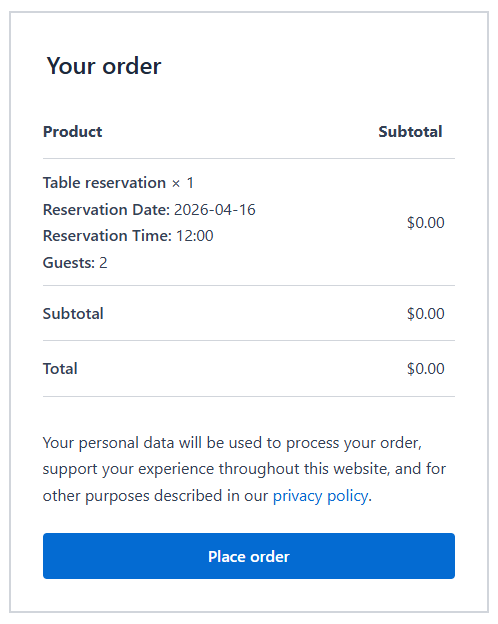
Customers see a straightforward booking form on the product page. They pick a date, choose from available time slots, enter the number of guests, and complete the reservation through your normal WooCommerce flow. The familiar checkout experience helps reduce friction and keeps the booking process simple.
Perfect for stores that want less complexity
If you want table reservations inside WooCommerce but do not want to deal with a bloated booking plugin, this is a strong fit. It covers the essentials, stays lightweight, and gives your business a clean reservation workflow that feels native to WooCommerce.
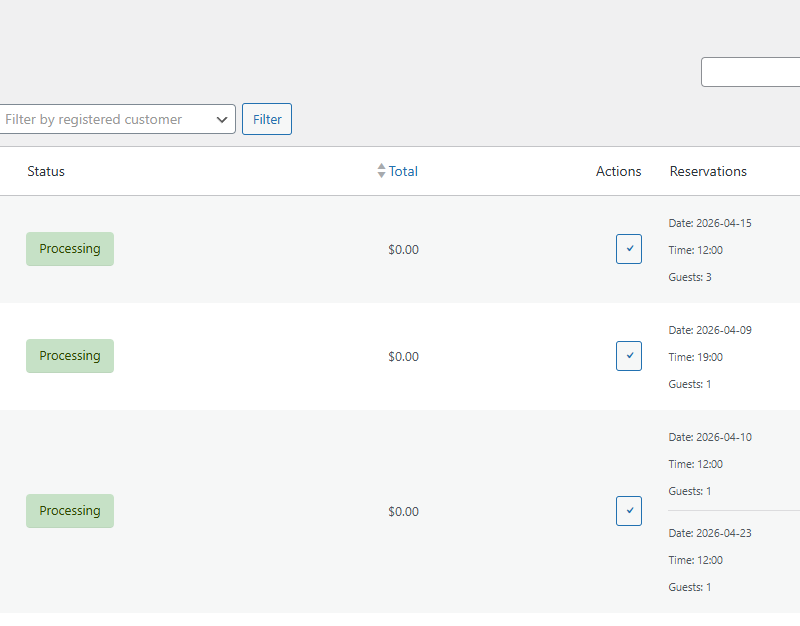
Order List Reservations
The order list has a new “Reservations” column.
Product Reservation List
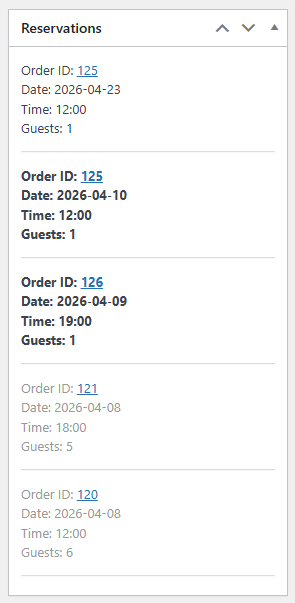
You can see all reservations for a product on the admin product edit page.
Frequently Asked Questions
How does the table reservation process work?
Customers select a reservation date, choose an available time slot, enter the number of guests, and complete the reservation through the standard WooCommerce cart and checkout process.
Can I enable reservations for specific products only?
Yes. Reservations can be enabled individually for each WooCommerce product, allowing you to use regular products and reservable products in the same store.
Can I configure reservation hours and time slots?
Yes. You can set the opening time, closing time, and slot interval for each reservable product. The plugin automatically creates the available time slots based on these settings.
How does the plugin help prevent overbooking?
You can set the total guest capacity for each time slot. When a customer selects a date and guest count, the plugin checks the remaining capacity and only displays time slots that can accommodate the reservation.
Can I limit the number of guests per reservation?
Yes. You can define the minimum and maximum number of guests allowed for each reservation.
Can I control how far in advance customers can book?
Yes. The plugin lets you control how far ahead customers are allowed to make reservations.
Where are reservation details displayed?
The selected reservation date, time, and guest count are shown in the cart and saved with the WooCommerce order item, making the booking information easy to review when managing an order.
Can I view reservations from the WooCommerce order list?
Yes. The plugin adds a “Reservations” column to the WooCommerce order list, so you can quickly see reservation information without opening every order.
Can I see all reservations for a particular product?
Yes. A reservation list is available on the product edit page, allowing you to review all reservations associated with that product in one place.
Does the plugin change the Add to Cart button?
Yes. For reservable products, the standard Add to Cart button text is replaced with “Reserve Table” to make the booking action clearer to customers.
Is the plugin compatible with WooCommerce HPOS?
Yes. WooCommerce Simple Table Reservations is compatible with High-Performance Order Storage (HPOS).
Reviews
There are no reviews yet.