
WooCommerce Quick Order Form (Table Layout)
Fast, Smarter Ordering for WooCommerce
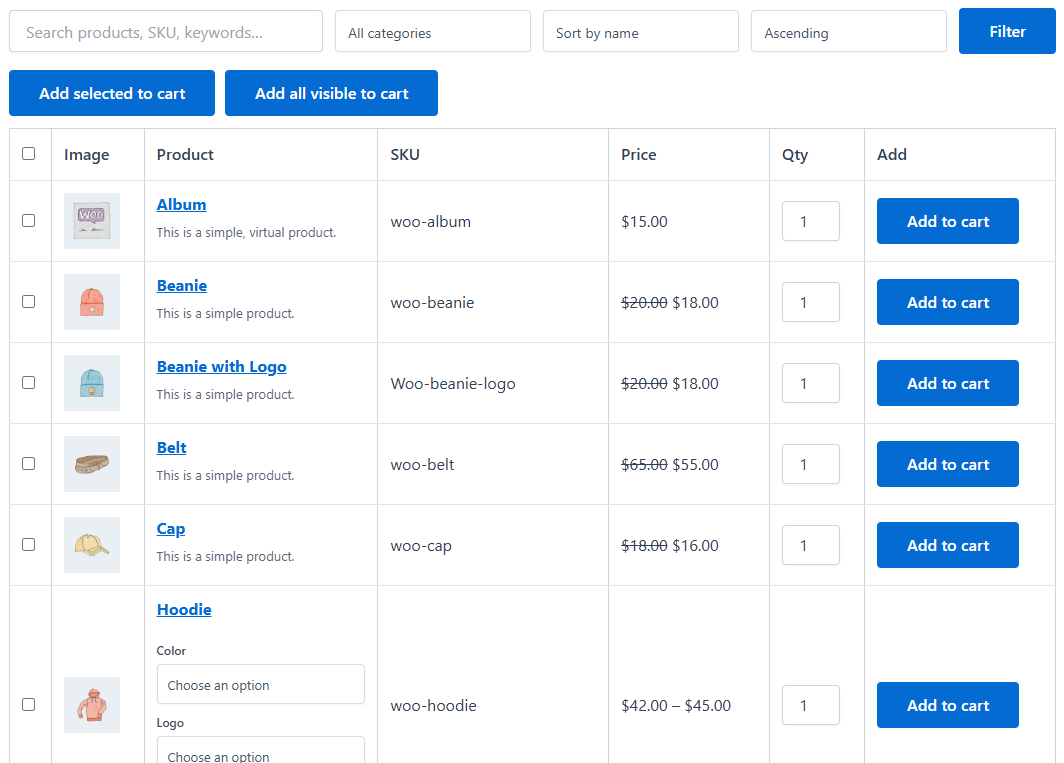
Plugnition Quick Order Form for WooCommerce transforms your product catalog into a fast, practical order form that helps customers add products to the cart with fewer clicks. Instead of opening product pages one by one, shoppers can browse products in a table layout, choose quantities, select variations, and place larger orders much more efficiently.
This plugin is a strong fit for wholesale stores, B2B shops, spare parts catalogs, office suppliers, restaurant supply stores, and any WooCommerce business that wants to speed up repeat or multi-item ordering.
Built for Faster Bulk and Repeat Orders
Standard WooCommerce product browsing works well for casual shopping, but it can slow down customers who already know what they want. A quick order form solves that problem by putting product details, quantities, variation selectors, and add-to-cart actions on a single screen.
That means less navigation, faster ordering, and a smoother path to checkout.
Smart Table-Based Ordering
The plugin displays products in a clean table layout where customers can scan items quickly and add them to the cart without unnecessary page loads. Search, sorting, filters, and bulk add-to-cart tools make the order process even more efficient for stores with larger catalogs.
Because the layout is shortcode-based, you can place it exactly where you need it: on a dedicated wholesale page, a reorder page, a category landing page, or a custom ordering screen.
Advanced Variable Product Support
Plugnition Quick Order Form for WooCommerce supports both simple and variable products. For variable products, customers can choose each attribute directly inside the table. The plugin automatically matches the correct variation, updates the variation price and SKU, and prevents invalid combinations from being selected.
This creates a much better ordering experience for products with sizes, colors, materials, or other selectable options.
Key Features
- Fast table-based WooCommerce order form
- Supports simple and variable products
- Separate variation selectors for each attribute
- Automatic variation matching
- Live variation price and SKU updates
- Product search for faster ordering
- Category filter support
- Sorting options for product lists
- Quantity fields directly in the table
- AJAX add to cart without page refresh
- Bulk add selected products to the cart
- Add all visible products to the cart
- SKU display for easy product identification
- Shortcode support for flexible placement
- Responsive mobile-friendly layout
- Lightweight and practical design
Designed for Real WooCommerce Stores
This plugin is ideal for stores where customers order multiple products in one session and want a faster way to move through the catalog. It works especially well for wholesale buyers, business customers, frequent repeat customers, and any store that sells products by SKU or structured product lists.
Instead of forcing customers through a slow browsing flow, you can give them a faster ordering experience that feels more efficient and more professional.
Flexible Display with Shortcodes
You can add the quick order form anywhere using a shortcode and control how it appears with shortcode options. Limit products, filter by category, show or hide SKU columns, enable or disable bulk add tools, and tailor the layout to fit different use cases across your store.
This flexibility makes it easy to build dedicated bulk ordering pages without changing your main WooCommerce shop structure.
How to Add the Quick Order Form to a Page
After activating the plugin, create a new WordPress page or edit an existing one, such as a wholesale ordering page. Add a Shortcode block, paste in the Quick Order Form shortcode – [plugnition_quick_order_form] – and publish or update the page.
Open the page on the front end to check that the product table appears. Customers can then find products, choose quantities and variations, and add items to their cart from the form. You can place the shortcode on more than one page and adjust its options to show the products and controls each page needs.
Example Use Cases
- Wholesale order pages
- B2B reorder forms
- Restaurant and supplier ordering screens
- Industrial and hardware product catalogs
- Office supplies and bulk inventory ordering
- Spare parts and component catalogs
- Fast repeat order pages for returning customers
Lightweight by Design
Like all Plugnition plugins, this plugin focuses on useful features without adding unnecessary complexity. It improves WooCommerce ordering speed while staying clean, lightweight, and easy to use.
If your store needs a faster way for customers to browse, select, and order multiple products, Plugnition Quick Order Form for WooCommerce gives you a practical solution that fits naturally into WooCommerce.
Frequently Asked Questions
What does the WooCommerce Quick Order Form plugin do?
The plugin displays your WooCommerce products in a convenient table layout, allowing customers to find products, select quantities, choose variations, and add multiple items to their cart more efficiently.
Does the quick order form support variable products?
Yes. Customers can select product attributes directly in the table. The plugin automatically finds the matching variation and updates its price and SKU.
Can customers add multiple products to the cart at once?
Yes. Customers can select several products and add them to the cart in one action. The plugin can also provide an option to add all currently visible products.
Does the plugin use AJAX when adding products to the cart?
Yes. Products can be added to the cart without refreshing the page, creating a faster and smoother ordering experience.
Can customers search, filter, and sort products?
Yes. The order form includes product search, category filtering, and sorting options to help customers quickly find the products they need.
Where can I display the quick order form?
You can place it on any page using a shortcode, including dedicated wholesale, B2B, reorder, category, or custom ordering pages.
Can I customize which products and columns are displayed?
Yes. Shortcode options let you limit the displayed products, filter them by category, show or hide SKU information, and control the available bulk ordering tools.
Is the quick order form mobile-friendly?
Yes. The table layout is responsive and designed to work across desktop, tablet, and mobile devices.
What types of stores can benefit from this plugin?
The plugin is especially useful for wholesale and B2B stores, suppliers, spare-parts catalogs, office supply stores, restaurants, and other businesses whose customers frequently order multiple products.
Reviews
There are no reviews yet.