
Plugnition Payment Gateway Fees for WooCommerce
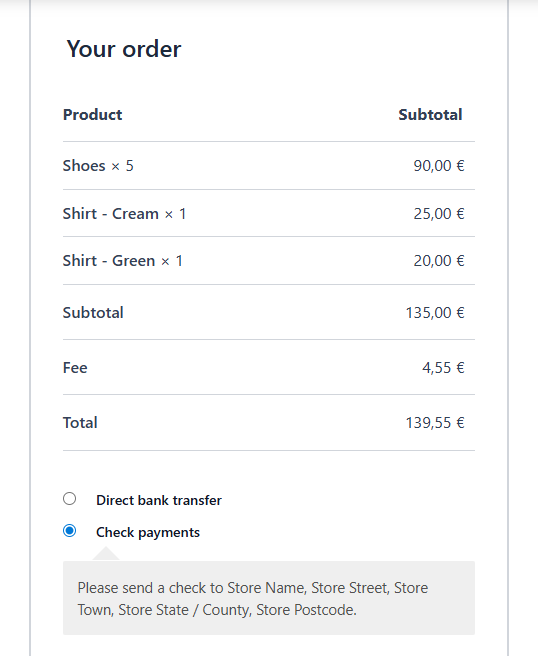
WooCommerce Payment Gateway Fees gives you full control over how your store handles payment-related costs by allowing you to automatically apply custom fees at checkout based on the selected payment method. The plugin integrates seamlessly with WooCommerce and requires no custom code or technical knowledge.
Different payment gateways often come with different processing fees. Instead of absorbing these costs into your margins, this plugin helps you recover transaction expenses or guide customers toward more cost-effective payment options — all while keeping pricing transparent and fair.
Flexible Fee Configuration
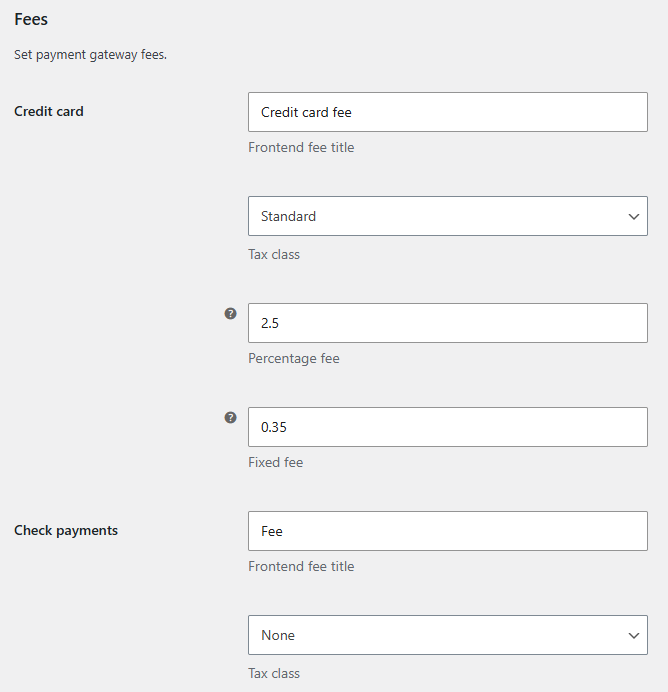
Configure fees individually for each payment gateway. You can apply a fixed amount, a percentage of the cart subtotal, or combine both, depending on your store’s needs. Fees are calculated automatically and added to the order total as soon as the customer selects their payment method.
- Set different fee rules for each payment gateway
- Choose between fixed fees, percentage fees, or a combination
- Customize the fee name shown to customers at checkout
- Optionally assign a tax class for accurate tax calculations
Checkout Pay Page Support
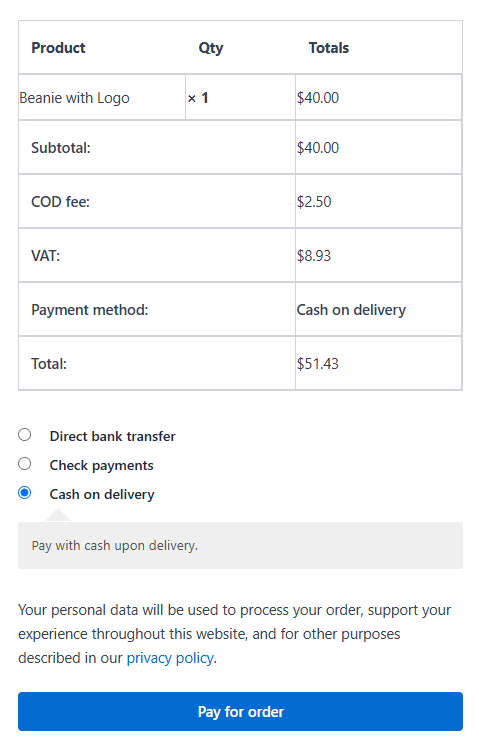
Payment gateway fees also work on the WooCommerce order payment page. When a customer pays for an existing order through the Pay for order page, the applicable fee is automatically calculated based on the selected payment method and added to the order total.
This makes payment gateway fee rules consistent whether customers pay during the initial checkout or pay for an existing order later.
WooCommerce Subscriptions Support
The plugin integrates with WooCommerce Subscriptions, allowing payment gateway fees to be applied to subscription renewal orders.
You can control whether gateway fees should be added to renewals, making it easy to account for payment processing costs on recurring payments as well as initial subscription purchases.

Key Features
- Set different fee rules for each payment gateway
- Choose between fixed fees, percentage fees, or a combination
- Customize the fee name shown to customers
- Optionally assign a tax class for accurate tax calculations
- Works on the standard WooCommerce checkout
- Supports the WooCommerce Pay for order page
- Supports WooCommerce Subscriptions renewal orders
- Compatible with both classic and block-based checkout
Clear & Transparent Checkout Experience
All fees are clearly displayed during checkout, ensuring customers understand exactly what they are paying for before placing their order. This transparency helps reduce confusion, prevent disputes, and build trust with your customers.
By clearly labeling payment-related fees, you can avoid hiding costs in product prices while still maintaining healthy profit margins.
Easy Setup — No Coding Required
We designed WooCommerce Payment Gateway Fees for store owners, not developers. All settings are managed directly within the WooCommerce admin interface, allowing you to set up and adjust fees in just a few clicks.
- Simple configuration inside WooCommerce settings
- No custom code or theme changes required
- Works with standard WooCommerce payment gateways
- Compatible with both WooCommerce classic and block-based checkout
Common Use Cases
- Add a percentage-based fee to cover higher transaction costs from digital wallets or card processors
- Apply a fixed surcharge for manual payment methods that require additional handling
- Encourage customers to use bank transfers or lower-cost gateways by keeping fees minimal or zero
- Maintain consistent product pricing while handling payment costs separately
Who Is This Plugin For?
This plugin is ideal for WooCommerce store owners who want more control over payment processing costs, improve pricing transparency, and optimize checkout behavior without negatively impacting the customer experience.
Install WooCommerce Payment Gateway Fees, define your fee rules, and let WooCommerce handle the calculations automatically.
Frequently Asked Questions
Can I set different fees for different payment gateways?
Yes. You can configure each WooCommerce payment gateway individually, allowing you to charge different fees depending on the payment method selected by the customer.
Can I charge a percentage-based fee?
Yes. Fees can be configured as a fixed amount, a percentage, or a combination of both.
Are payment gateway fees displayed to customers at checkout?
Yes. The fee is added to the order totals and clearly displayed to the customer before the order is placed.
Does the plugin support the WooCommerce Pay for order page?
Yes. Payment gateway fees can also be applied when customers pay for an existing order through the WooCommerce Pay for order page. The fee is recalculated when the customer selects a payment method.
Does the plugin support WooCommerce Subscriptions?
Yes. The plugin integrates with WooCommerce Subscriptions and can apply payment gateway fees to subscription renewal orders. You can choose whether payment gateway fees should be added to renewals.
Can payment gateway fees be taxed?
Yes. You can assign a WooCommerce tax class to the fee, allowing WooCommerce to calculate the applicable tax automatically.
Does it work with WooCommerce Checkout Blocks?
Yes. The plugin is compatible with both the classic WooCommerce checkout and block-based checkout.
Do I need to write any code?
No. Payment gateway fee rules are configured directly from the WooCommerce admin area, with no coding or theme modifications required.
Does the plugin support HPOS?
Yes. WooCommerce Payment Gateway Fees is compatible with WooCommerce High-Performance Order Storage (HPOS).

Maria Galvez (verified owner) –
WooCommerce Payment Gateway Fees checked every box for us. We needed a reliable, flexible way to apply payment gateway fees, and the plugin makes the setup straightforward without being overly complicated.
The settings are easy to understand, the plugin works as expected, and it gives us the control we needed to manage fees effectively in WooCommerce. Most importantly, the support has been outstanding—responsive, knowledgeable, and genuinely helpful when we had questions.
If you need an easy-to-use solution for payment gateway fees in WooCommerce, this plugin is an excellent choice. Highly recommended!